Texture Issues: Asphalt placed on Terrain displays as Sand texture

Version
V 2.6 (b14)
Platform
Windows
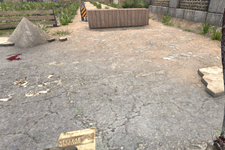
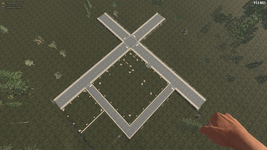
Hi everyone,I wanted to upgrade the sand path next to my house to a proper asphalt road. I excavated two layers of sand and replaced them with Asphalt blocks. However, after placement, the path still visually looks like sand.

I’ve searched for solutions and found similar reports from 2-3 years ago, but nothing recent. To test further, I excavated three layers, placed a base layer of concrete blocks, and put two layers of asphalt on top. Unfortunately, the game still displays the sand texture on top of the asphalt.

Is this a known bug with the terrain system, or is there a specific trick to building roads that I am missing?


Actual Result: The surface retains the Sand texture instead of showing Asphalt.Expected Result: The surface should display the Asphalt texture.

Note: I am currently on the latest stable build.

Thanks in advance for any help!
 
Reproduction Steps
Steps to Reproduce:

  1. Find a natural Sand terrain area.
  2. Dig out 2-3 layers of Sand.
  3. Place Asphalt blocks into the excavated area.
  4. Observe the top texture.
Link to Logs
https://justpaste.it/i7z6w
Link to Screenshot/Video
https://imgur.com/a/5SOW3re

Attachments

  • Bild_2026-04-20_021402507.png
    Bild_2026-04-20_021402507.png
    1.9 MB · Views: 2
Hi everyone,I wanted to upgrade the sand path next to my house to a proper asphalt road. I excavated two layers of sand and replaced them with Asphalt blocks. However, after placement, the path still visually looks like sand.

I’ve searched for solutions and found similar reports from 2-3 years ago, but nothing recent. To test further, I excavated three layers, placed a base layer of concrete blocks, and put two layers of asphalt on top. Unfortunately, the game still displays the sand texture on top of the asphalt.

Is this a known bug with the terrain system, or is there a specific trick to building roads that I am missing?


Actual Result: The surface retains the Sand texture instead of showing Asphalt.Expected Result: The surface should display the Asphalt texture.

Note: I am currently on the latest stable build.

Thanks in advance for any help!
It has already been reported and confirmed as a bug. Unfortunately, there is no word yet on when it will be fixed.
It would be great if it could be fixed soon.
We’ve created special 3D blocks for asphalt, dirt, grass, and gravel so we can restore everything to its original state, since there’s no indication of when this might be fixed. :D
See here:
 
Last edited:
It has already been reported and confirmed as a bug. Unfortunately, there is no word yet on when it will be fixed.
It would be great if it could be fixed soon.
We’ve created special 3D blocks for asphalt, dirt, grass, and gravel so we can restore everything to its original state, since there’s no indication of when this might be fixed. :D
See here:
I've read that this problem has apparently been around for several years, but I can't imagine that there still isn't a solution for it. If the problem has been around for so long, the developers would surely have done something to fix it by now or maybe they just aren't interested in fixing it.
 
I've read that this problem has apparently been around for several years, but I can't imagine that there still isn't a solution for it. If the problem has been around for so long, the developers would surely have done something to fix it by now or maybe they just aren't interested in fixing it.
Not really. This is new. Terrain *does* blend and that is intentional, but if you understand how it blends, it was never a problem making paths or roads or whatever and having them show properly. What is happening now is a bug that came in 2.6.
 
Back
Top