Thedarklurch
Refugee
- Version
- V 2.6 (b14)
- Platform
- Windows
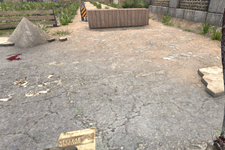
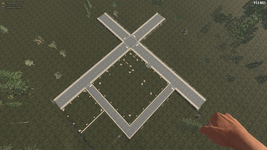
Hi everyone,I wanted to upgrade the sand path next to my house to a proper asphalt road. I excavated two layers of sand and replaced them with Asphalt blocks. However, after placement, the path still visually looks like sand.
I’ve searched for solutions and found similar reports from 2-3 years ago, but nothing recent. To test further, I excavated three layers, placed a base layer of concrete blocks, and put two layers of asphalt on top. Unfortunately, the game still displays the sand texture on top of the asphalt.
Is this a known bug with the terrain system, or is there a specific trick to building roads that I am missing?
Actual Result: The surface retains the Sand texture instead of showing Asphalt.Expected Result: The surface should display the Asphalt texture.
Note: I am currently on the latest stable build.
Thanks in advance for any help!
I’ve searched for solutions and found similar reports from 2-3 years ago, but nothing recent. To test further, I excavated three layers, placed a base layer of concrete blocks, and put two layers of asphalt on top. Unfortunately, the game still displays the sand texture on top of the asphalt.
Is this a known bug with the terrain system, or is there a specific trick to building roads that I am missing?
Actual Result: The surface retains the Sand texture instead of showing Asphalt.Expected Result: The surface should display the Asphalt texture.
Note: I am currently on the latest stable build.
Thanks in advance for any help!
- Reproduction Steps
- Steps to Reproduce:
- Find a natural Sand terrain area.
- Dig out 2-3 layers of Sand.
- Place Asphalt blocks into the excavated area.
- Observe the top texture.
- Link to Logs
- https://justpaste.it/i7z6w
- Link to Screenshot/Video
- https://imgur.com/a/5SOW3re