ODARKNESSO
Refugee
- Version
- 2.6
- Platform
- PS5
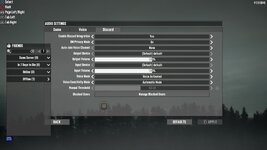
I’m having an issue with the Discord integration in 7 Days to Die on PS5. When the feature was first introduced, I accidentally selected “Later” (or canceled the linking process), and the game created a Provisional Account instead of linking my real Discord account.
Now, whenever I open the Friends menu, it only shows this provisional account with my PSN name, and my friends see it as a “Provisional Account” with the message: “This 7 Days to Die user does not have a Discord account yet so some features may be limited.”
I have already unlinked and relinked Discord through my PS5 settings, but the game still uses the provisional account and never gives me the option to link my actual Discord account. Is it possible to reset or remove the provisional account from my 7 Days to Die profile so I can properly connect my real Discord account?
Now, whenever I open the Friends menu, it only shows this provisional account with my PSN name, and my friends see it as a “Provisional Account” with the message: “This 7 Days to Die user does not have a Discord account yet so some features may be limited.”
I have already unlinked and relinked Discord through my PS5 settings, but the game still uses the provisional account and never gives me the option to link my actual Discord account. Is it possible to reset or remove the provisional account from my 7 Days to Die profile so I can properly connect my real Discord account?
- Reproduction Steps
- Idk what this means but Allow me to unlink Discord off my account to add a different account
- Link to Logs
- https://pastebin.com/
- Link to Screenshot/Video
- https://www.reddit.com/r/7daystodie/s/Hz9Z2SWMma