• Mods are now organized as resources. Use the Mods link above to browse for or submit a mod, tool, or prefab.

    The TFP Official Modding Forum Policy establishes the rules and guidelines for mod creators and mod users.

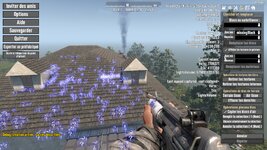
Need help: How to mass-delete "Missing Texture" blocks (blue squares with question marks)?

noname835

Refugee
Hi everyone,

I’m looking for a fast and efficient way to remove all the transparent blue blocks with a blue question mark inside. I'm aware these are obsolete or missing blocks from a previous version/mod, but I can't seem to get rid of them.

I’ve spent hours trying to use the "Find and Replace" menu. Whether I try a single selection or a mass selection, I can't find the correct ID to target them, nor a way to replace them with air or another block.

Does anyone know a specific command, tool, or workaround to identify these "placeholder" blocks and delete them all at once?

Thanks in advance for your help!
20260515124049_1-jpg.39219
 

Attachments

  • 20260515124049_1.jpg
    20260515124049_1.jpg
    1.7 MB · Views: 25
I suspect the "prefabupdater" is what you're after. I once wrote up some notes about using it for KatsPurr, which you can read here:

 
Yeah, do the update commands that ZZTong mentioned. It'll fix the majority of blocks (perhaps all). Anything remaining can just be replaced. If you can't use the find/replace, you can manually remove them by clicking on them and deleting the block like you would with any blocks you want to change in the POI Editor.
 
Thanks for your replies!

First, to answer Blue Mame: I have of course tried that, but unfortunately, nothing is working.

Regarding zztong's suggestion: I entered the three commands. I could see in the console that all my POIs were being processed. The last command did take quite a while, I saw all the POIs being scanned, and some of my personal POIs were modified.

And to answer Riamus: Yes, usually I do it that way, block by block, and it works perfectly. However, in this case, there are hundreds of them, which is why I reached out to you to find a more efficient solution.

Thanks again for your help!


Quick update:I tried Blue Mame's trick again, even though I had already tried it several times before. In my previous attempts, I didn't save because the blue transparent squares with the question marks were still showing on the screen.

This time, I went ahead, saved, and reloaded the POI, and I can confirm that it works! A huge thank you to Blue Mame and everyone else for your help.
 
Last edited:
Thanks for your replies!

First, to answer Blue Mame: I have of course tried that, but unfortunately, nothing is working.

Regarding zztong's suggestion: I entered the three commands. I could see in the console that all my POIs were being processed. The last command did take quite a while, I saw all the POIs being scanned, and some of my personal POIs were modified.

And to answer Riamus: Yes, usually I do it that way, block by block, and it works perfectly. However, in this case, there are hundreds of them, which is why I reached out to you to find a more efficient solution.

Thanks again for your help!


Quick update:I tried Blue Mame's trick again, even though I had already tried it several times before. In my previous attempts, I didn't save because the blue transparent squares with the question marks were still showing on the screen.

This time, I went ahead, saved, and reloaded the POI, and I can confirm that it works! A huge thank you to Blue Mame and everyone else for your help.
If you follow my steps, it will work normally, because that's how I handled it. You missed a save and reload step. You'll understand later. It's possible that my expression was flawed, as it seemed contradictory. Firstly, my English isn't great, and secondly, the whole operation seemed contradictory. However, you need this seemingly contradictory approach for it to work.lol
 
If you follow my steps, it will work normally, because that's how I handled it. You missed a save and reload step. You'll understand later. It's possible that my expression was flawed, as it seemed contradictory. Firstly, my English isn't great, and secondly, the whole operation seemed contradictory. However, you need this seemingly contradictory approach for it to work.lol
I also use a translator because I speak French ;-), but your technique works perfectly. I didn't know I had to save and 'reload' the POI. I thought it removed the defective cubes in real time, but nope! It's only when it's saved and reloaded that those ■■■■ blue cubes disappear. Thanks again!
 
I also use a translator because I speak French ;-), but your technique works perfectly. I didn't know I had to save and 'reload' the POI. I thought it removed the defective cubes in real time, but nope! It's only when it's saved and reloaded that those ■■■■ blue cubes disappear. Thanks again!
You were able to complete the repair entirely thanks to your intelligence. It was only then that I realized I was cursed by knowledge; I didn't explain why saving and reloading was necessary. In my understanding, it was self-evident, but it's incomprehensible to those who don't understand. For example, why save and reload? Because replacing the problematic block didn't fix it.
 
Back
Top