V3.0.0 b259 EXP Update

@Laz Man
I am quite sure you or someone else in the group has already thought about this
but I want to ask what you think about it directly.

The things that made me think about it now are
1 The post about adjusting the entities for personal preference.
2 The vast differences in personal preference,
3 Size file concern for consoles to easily use
4 Remembering the past where this can just become a Nit pick session that can run out of control.
5 Twitch integration
6 The options menu
7 plenty of posts regarding, repetitiveness in pois and learning the runs and what is where.

What I thought about was, if the xml files in the prefab subfolders had an internal tag that was added
or already exists. That would allow that configuration to call to a specific poi. What I mean is you could
have the same poi visually, but using some option designator it could completely randomized the sleeper,
roamer which I have not noticed yet, volume size, Gslevel, or be completely randomized on a per approach
and activate. The last one I thought about because, until you get within a specific distance, the spawn volume
is deactivated. The poi can remain the same, the volume size shape and locations same, triggers can remain
the same or randomized.

The result is if a player likes and wants, legacy they have it, if they turn off screen indicators thanks for that by
the way, they can have a random encounter, it can have a parental option choice for beginners, on twitch
it would allow twitch interaction, where the participants could throw all kinds of chaos into the stream, as long
as the specific volume had not been activated yet. Streamers could create and run their own custom gauntlets.

The main result is, with out you having to do redo undo and readjust, the game experience can grow with the end
user, sort of like the AI games that adjust internally according to telemetry. Instead or AI you can use your eye to
add the configs. In regard to size if you were to equally affect all of the parts, tiles, pois, 1 gigabyte of data would
allow for 104 individual variations per element.
 
View attachment 39684
Hello Survivors!

Today we have another EXP update for all of you!

Here is how you participate:
  1. Right click on the game in steam
  2. Click on properties
  3. Click the “Game Versions & Betas” tab
  4. The drop down menu will have latest_experimental available <— you want THAT
  5. Select that and wait for the game to download

We also made a new branch called: latest_experimental_fallback for anyone who is still pulling b252 on latest_experimental


Here is what changed since b257:


Added
  • Print Sandbox settings to log on game start and provide a console command to list options (getsandboxoptions / gso)
  • WebAPI "sandboxsettings" allowing looking up the current settings and custom codes, including all the sandbox settings details the UI provides
  • Sandbox Option for Crouch Run Speed
  • XUi system_time binding returning the current local DateTime to allow showing real world time on the UI
  • XUi methods to register XML attribute/binding handlers for existing controllers and views
Changed
  • Reworked Tempered Blade mod to have the same values as other block damage mods. 10-60% reduced to 5-30%.
  • Reworked Ergonomic Grip mod to prevent stacking issues with other perks and items. 10-60% reduced to 5-30%.
  • Reworked Fortifying Grip with logic to prevent it from working without food or water
  • Siphoning Strikes and Bar Brawling Vol 5 will no longer work without food or water
  • Updated tags on ammo to support Lucky Looter Vol 2 and Sandbox Options
  • House_construction_02 replaced bear sleeper placement with animal boar for difficulty balancing
  • Updated loot in industrial_strip_03 to have more automotive loot
Fixed
  • Cannot use items from inventory after previous game session was interrupted
  • Sandbox option Global Loot Stage does not affect loot stage
  • Sandbox option Crouch Speed 300% is faster than Walk Speed 300%
  • Sandbox setting Drop on Death Delete all does not work
  • Sandbox setting Global Game Stage to Low will set starting game stage to zero
  • Forge allows free recipe when Sandbox smelter type is selected
  • Cannot pick up user-placed items at claimed trader
  • Minimum speed was not using the speed modifier sandbox options correctly
  • Crafting materials limit production of items when crafting cost is set to none
  • Crafting Input not working for None
  • Wrong tag on Cooking Grill allowing it to influence cook times when holding an additional grill
  • XUi Color values outside of the allowed 0-255 range were not properly clamped but rather truncated
  • Turret corrupts block space for other devices
  • Replaced missing box collider on bat_Prefab
Vehicle Model problems
Here is what i can see on the current vehicle models of what should get addressed to make the game feel more complete and not just slapped together.

Bicycle:
-Kick stand on the bike should activate when you get off. and have a slight lean or have a toggle for it to be on and off.

Mini Bike:
-The handle bars pivot from the front edge of the tire , this causes clipping in the model.

Motorcycle:
-The Motorcycle also has a kickstand that does not work.

4x4 Truck:
-Axels and hubs do not line up also the suspension & tie rods don't move just tires move.

Gyrocopter:
-Top and Rear Propellors spin in the wrong direction, the angle of the blades show this.
-The tires do not rotate when on the ground, also the front tire should steer left and right.
-The joy stick does not move with the input of controls and characters arms stay locked in position( this is the only vehicle that does not interact with the character model).
-Elevators and rudder should move in the proper direction to the input of controls.

As we use vehicles for a good part of the game driving from job to job this would clean up the game and give a finished look.


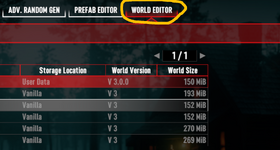
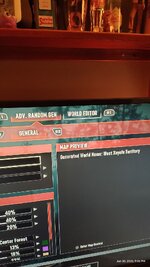
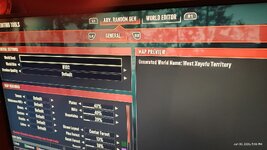
So I noticed on the Ps5 with the 3.0 update that the World Editor tab is available(not sure if it was meant to be) so I tried it out out and tries to load a world save but hangs the ps5 with no way to back out....Sorry if in wrong section....
 

Attachments

  • ps5 world7.png
    ps5 world7.png
    440.9 KB · Views: 5
So I noticed on the Ps5 with the 3.0 update that the World Editor tab is available(not sure if it was meant to be) so I tried it out out and tries to load a world save but hangs the ps5 with no way to back out....Sorry if in wrong section....
I do not think that is intended. May I ask how you got to that screen? I wasn't able to get the same exact tabs as you on the PS5 (showing prefab editor and world editor)
 
I do not think that is intended. May I ask how you got to that screen? I wasn't able to get the same exact tabs as you on the PS5 (showing prefab editor and world editor)
Umm sorry that screen shot was from the pc i was just using that as an example, I added a couple pictures i took with my phone on the tv...the pre fab tab isn't there on ps5 its just the world editor tab that is. Its there when i go into advanced world generation screen to create a new world. It just gets stuck trying to load a world save.
 

Attachments

  • 1000004377.jpg
    1000004377.jpg
    209.1 KB · Views: 14
  • 1000004378.jpg
    1000004378.jpg
    210 KB · Views: 14
Last edited:
Umm sorry that screen shot was from the pc i was just using that as an example, I added a couple pictures i took with my phone on the tv...the pre fab tab isn't there on ps5 its just the world editor tab that is. Its there when i go into advanced world generation screen to create a new world. It just gets stuck trying to load a world save.
Ah okay thanks! Good to know that the prefab editor isn't also showing up on consoles. I made a ticket for this so we can get the world editor one addressed
 
@faatal Just for reference, this is a road in 3.0 RWG. It takes you to the Dug In Denizens POI. I assume that road isn't part of the POI. I think this is the most extreme example of a messed up road so far. Most are just 1-3 meter drops. I ran off this without realizing it dropped like that. The next image is what I saw at the top. This seems to have been a POI placed inside a crevice/crack and then the road couldn't figure out how to gradually descend even though there were other places where that would have been possible.
View attachment 39738

View attachment 39739
I feel bad for the person paving that road smh
 
The bear below the construction site was way too iconic imo, real shame it's removed now. I hope you reconsider and bring it back. For balance, you could simply increase the POI difficulty by 1–2 red skulls. Otherwise, all these changes & options in the 3.0+ updates feel amazing! The game is finally becoming the true sandbox everyone wanted.

More sandbox toggles I'd personally love to see next:
  • Wandering Horde Size
  • Wandering Horde Frequency
  • Wandering Horde Lootbag Drop Chance
  • Bloodmoon Vulture Attacks - Disabled / Target Vehicles Only (Default) / Target Always
  • Special Biome Zombie Spawn Rate - Reduce or increase amount of chucks / plaguespitters / mutants in the wild.

  • Schematic Abundance
  • Mod Abundance
  • Salvage Yield - similar to ore yield, but for cars/pipes/electronics.
  • Wood Yield - same for trees and bushes.
  • Honey Yield - a lot of players would like to change the drop percentages of honey from stumps.
  • Bee Spawn Chance
  • Crop Auto Replant - Enabled / Disabled. Harvesting mature crops make a new seed spawn automatically.
  • Crop Pickup - If enabled, you can collect mature crops by pressing E. Will make farming super comfortable when combined with Crop Replant setting.

  • Trap Player Damage - when set to 0% traps are safe for players.
  • Trap Zombie Damage
  • Trap Pickup - If enabled, you can collect traps with full durability by pressing E.
  • Storm Damage - 100% is default, you can lower or disable it.
  • Temperature Damage - If set above 0%(default), players can freeze/overheat to death.
  • Player Injuries Chance - Configure how often injuries occur. Affects mostly zombie-inflicted injuries.
Some more fun / challenge settings, most are disabled by default:
  • Air Drop Horde Spawn Chance - when looting an air drop determines chance to summon a wandering horde
  • Minefield - Random landmines can spawn throughout the world in any biome, replacing small grass, rocks, or plants.
  • Radiated Water – You receive damage and the Radiation effect while swimming or standing in water, or while exposed to rain.
  • Solar Apocalypse – You burn in direct sunlight during the daytime. Desert-only challenges will feel so much different with this setting.
  • Exploding Zombies. Yep, when they die, they have chance to explode.
Most of these settings would be relatively easy to add to the game, yet they would massively increase its replayability. They would also lead to even more game Presets that would genuinely feel distinct from one another. Speaking of presets, please replace the current half-AI slop icons. They don't fit the game's style at all. Even simple screenshots of in-game locations or zombie models would look much better and feel far more fitting tbf.
Incredibly thoughtful post! BUMP BUMP BUMP
 
Are there any plans to fix this so that the generated roads are laid out correctly, without any strange anomalies or jumps? (I asked a while ago whether the map might have too low a percentage of hills set.)
And what about the chicken coop?
 
Vehicle Model problems
Here is what i can see on the current vehicle models of what should get addressed to make the game feel more complete and not just slapped together.

Bicycle:
-Kick stand on the bike should activate when you get off. and have a slight lean or have a toggle for it to be on and off.

Mini Bike:
-The handle bars pivot from the front edge of the tire , this causes clipping in the model.

Motorcycle:
-The Motorcycle also has a kickstand that does not work.

4x4 Truck:
-Axels and hubs do not line up also the suspension & tie rods don't move just tires move.

Gyrocopter:
-Top and Rear Propellors spin in the wrong direction, the angle of the blades show this.
-The tires do not rotate when on the ground, also the front tire should steer left and right.
-The joy stick does not move with the input of controls and characters arms stay locked in position( this is the only vehicle that does not interact with the character model).
-Elevators and rudder should move in the proper direction to the input of controls.

As we use vehicles for a good part of the game driving from job to job this would clean up the game and give a finished look.


I would love to see the kickstands working properly.
 
TFP in the splat3processed image, can you add a color for Trader compounds
to either yellow or white.

There is blue for water, Red for asphalt and city/town pois, Green for
wilderness pois and gravel paths. But no color to differentiate for the
traders. It would help with creating shared custom maps, in order
to keep with the standard progression.

There are other mod options to accomplish it also. This would help make
it more precise when painting, biomes.
 
Back
Top