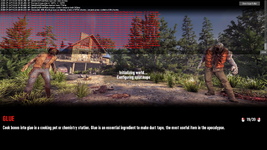
Windows Game no longer loads.

B_Unicorn

Refugee
Version
3.1 and latest experimental
Platform
Windows
Sandbox Code
AAGLAHNAFMEINAIEAJCBAABBABDCBOABVACDACEABWNBZBCFBCHCCOGCPJCXBCYGEBBEXGEWAFDBETA
Yesterday while playing on the current stable build i would randomly get the on screen logs pop up with errors but all would be ok once i had closed it down. I just kept playing and didn't really think much of it, i know stupid of me.
Then today i wanted to try the new chicken coop experimental version and switched, loaded the game up, changed a couple of minor sandbox settings, jar return and infection rate lowered.
Continued saved game and it wont load past the Initializing world, Configuring splatmaps the screen logs pop up with errors and it wont load.
So i reverted back to the current stable build and same keeps happening.
I have no idea what's going on and now cannot play..... Help!
 
Reproduction Steps
This just happens as i load into the game.
Link to Logs
https://pastebin.com/nW8N0mCK
Link to Screenshot/Video
https://drive.google.com/file/d/1t5fZvweAjyqkYtd1palORAy3FetDSbjL/view?usp=drive_link

Attachments

  • 251570_20260724153950_1.png
    251570_20260724153950_1.png
    2.5 MB · Views: 2
You have some corrupted regions in that world. Sadly something still happening too often in the game. You can go to where these listed files are and delete the ones mentioned and it should let you load in again, but do note anything in those regions will reset to its default state. So if your base is in one of them, it'll be gone/reset to default POI. Just an FYI. Try deleting the r.0.1.7rg file.

Code:
Invalid region file name: C:\Users\markr\AppData\Roaming\7DaysToDie\Saves\Navezgane\PrefabEditor\Region\error_backup_-11_61.comp.bak
Invalid region file name: C:\Users\markr\AppData\Roaming\7DaysToDie\Saves\Navezgane\PrefabEditor\Region\error_backup_-11_61.uncomp.bak
Invalid region file name: C:\Users\markr\AppData\Roaming\7DaysToDie\Saves\Navezgane\PrefabEditor\Region\error_backup_11_45.comp.bak
Invalid region file name: C:\Users\markr\AppData\Roaming\7DaysToDie\Saves\Navezgane\PrefabEditor\Region\error_backup_11_45.uncomp.bak
Invalid region file name: C:\Users\markr\AppData\Roaming\7DaysToDie\Saves\Navezgane\PrefabEditor\Region\error_backup_13_42.comp.bak
Invalid region file name: C:\Users\markr\AppData\Roaming\7DaysToDie\Saves\Navezgane\PrefabEditor\Region\error_backup_13_42.uncomp.bak
Invalid region file name: C:\Users\markr\AppData\Roaming\7DaysToDie\Saves\Navezgane\PrefabEditor\Region\error_backup_15_42.comp.bak
Invalid region file name: C:\Users\markr\AppData\Roaming\7DaysToDie\Saves\Navezgane\PrefabEditor\Region\error_backup_15_42.uncomp.bak
Invalid region file name: C:\Users\markr\AppData\Roaming\7DaysToDie\Saves\Navezgane\PrefabEditor\Region\error_backup_16_38.comp.bak
Invalid region file name: C:\Users\markr\AppData\Roaming\7DaysToDie\Saves\Navezgane\PrefabEditor\Region\error_backup_16_38.uncomp.bak
Invalid region file name: C:\Users\markr\AppData\Roaming\7DaysToDie\Saves\Navezgane\PrefabEditor\Region\error_backup_17_42.comp.bak
Invalid region file name: C:\Users\markr\AppData\Roaming\7DaysToDie\Saves\Navezgane\PrefabEditor\Region\error_backup_17_42.uncomp.bak
Invalid region file name: C:\Users\markr\AppData\Roaming\7DaysToDie\Saves\Navezgane\PrefabEditor\Region\error_backup_6_46.comp.bak
Invalid region file name: C:\Users\markr\AppData\Roaming\7DaysToDie\Saves\Navezgane\PrefabEditor\Region\error_backup_6_46.uncomp.bak
Invalid region file name: C:\Users\markr\AppData\Roaming\7DaysToDie\Saves\Navezgane\PrefabEditor\Region\error_backup_99_48.comp.bak
Invalid region file name: C:\Users\markr\AppData\Roaming\7DaysToDie\Saves\Navezgane\PrefabEditor\Region\error_backup_99_48.uncomp.bak
Exception: Incorrect region file header! C:\Users\markr\AppData\Roaming\7DaysToDie\Saves\Navezgane\PrefabEditor\Region/r.0.1.7rg
  at RegionFileSectorBased.Get (System.String dir, System.Int32 rX, System.Int32 rZ, System.String ext) [0x00061] in <5337cd8e13bc47c98028d0c180beab3e>:0
  at RegionFileAccessSectorBased.OpenRegionFile (System.String _dir, System.Int32 _regionX, System.Int32 _regionZ, System.String _ext) [0x00000] in <5337cd8e13bc47c98028d0c180beab3e>:0
  at RegionFileAccessMultipleChunks.GetRFC (System.Int32 _regionX, System.Int32 _regionZ, System.String _dir, System.String _ext) [0x00067] in <5337cd8e13bc47c98028d0c180beab3e>:0
  at RegionFileAccessMultipleChunks.ReadDirectory (System.String _dir, System.Action`3[T1,T2,T3] _chunkAndTimeStampHandler, System.Int32 chunksPerRegionPerDimension) [0x000a5] in <5337cd8e13bc47c98028d0c180beab3e>:0
  at RegionFileAccessSectorBased.ReadDirectory (System.String _dir, System.Action`3[T1,T2,T3] _chunkAndTimeStampHandler) [0x00000] in <5337cd8e13bc47c98028d0c180beab3e>:0
  at RegionFileManager..ctor (System.String _loadDirectory, System.String _saveDirectory, System.Int32 _maxChunksInCache, System.Boolean _bSaveOnChunkDrop) [0x001ee] in <5337cd8e13bc47c98028d0c180beab3e>:0
  at ChunkProviderGenerateWorldFromRaw+<Init>d__17.MoveNext () [0x008ee] in <5337cd8e13bc47c98028d0c180beab3e>:0
  at UnityEngine.SetupCoroutine.InvokeMoveNext (System.Collections.IEnumerator enumerator, System.IntPtr returnValueAddress) [0x00026] in <c39a522eee05469b8171a6cfeb646c59>:0
 
You have a broken region file. Normally you should use the region reset command to fix region problems (rr help in the console to see how to use it), but that probably won't work if you can't fully open the save. So you'll have to go to your saves folder for that map and find your region files. Most likely, at least one of them has a file size of 0. Delete it and start your save. However, be aware that whatever region(s) are deleted in this way will revert to their original state from the beginning of the game... if there are bases or anything else built in that region, it'll all be gone. If you are lucky, it won't be where your base is. If it is, you can either start your base and storage over or else start a new save. The game makes backups, but if you load the save again after it's broken, the backup will also have the same broken save, so at this point, you've already loaded it again and your backup won't help.

In the future, be aware that errors in the console can be a serious issue. Don't just load the game again... make sure you have your own backup of the save first that will hopefully not be broken. Regular backups of your saves can also save you from losing an entire save. But that doesn't help you now.
 
You have some corrupted regions in that world. Sadly something still happening too often in the game. You can go to where these listed files are and delete the ones mentioned and it should let you load in again, but do note anything in those regions will reset to its default state. So if your base is in one of them, it'll be gone/reset to default POI. Just an FYI. Try deleting the r.0.1.7rg file.

Code:
Invalid region file name: C:\Users\markr\AppData\Roaming\7DaysToDie\Saves\Navezgane\PrefabEditor\Region\error_backup_-11_61.comp.bak
Invalid region file name: C:\Users\markr\AppData\Roaming\7DaysToDie\Saves\Navezgane\PrefabEditor\Region\error_backup_-11_61.uncomp.bak
Invalid region file name: C:\Users\markr\AppData\Roaming\7DaysToDie\Saves\Navezgane\PrefabEditor\Region\error_backup_11_45.comp.bak
Invalid region file name: C:\Users\markr\AppData\Roaming\7DaysToDie\Saves\Navezgane\PrefabEditor\Region\error_backup_11_45.uncomp.bak
Invalid region file name: C:\Users\markr\AppData\Roaming\7DaysToDie\Saves\Navezgane\PrefabEditor\Region\error_backup_13_42.comp.bak
Invalid region file name: C:\Users\markr\AppData\Roaming\7DaysToDie\Saves\Navezgane\PrefabEditor\Region\error_backup_13_42.uncomp.bak
Invalid region file name: C:\Users\markr\AppData\Roaming\7DaysToDie\Saves\Navezgane\PrefabEditor\Region\error_backup_15_42.comp.bak
Invalid region file name: C:\Users\markr\AppData\Roaming\7DaysToDie\Saves\Navezgane\PrefabEditor\Region\error_backup_15_42.uncomp.bak
Invalid region file name: C:\Users\markr\AppData\Roaming\7DaysToDie\Saves\Navezgane\PrefabEditor\Region\error_backup_16_38.comp.bak
Invalid region file name: C:\Users\markr\AppData\Roaming\7DaysToDie\Saves\Navezgane\PrefabEditor\Region\error_backup_16_38.uncomp.bak
Invalid region file name: C:\Users\markr\AppData\Roaming\7DaysToDie\Saves\Navezgane\PrefabEditor\Region\error_backup_17_42.comp.bak
Invalid region file name: C:\Users\markr\AppData\Roaming\7DaysToDie\Saves\Navezgane\PrefabEditor\Region\error_backup_17_42.uncomp.bak
Invalid region file name: C:\Users\markr\AppData\Roaming\7DaysToDie\Saves\Navezgane\PrefabEditor\Region\error_backup_6_46.comp.bak
Invalid region file name: C:\Users\markr\AppData\Roaming\7DaysToDie\Saves\Navezgane\PrefabEditor\Region\error_backup_6_46.uncomp.bak
Invalid region file name: C:\Users\markr\AppData\Roaming\7DaysToDie\Saves\Navezgane\PrefabEditor\Region\error_backup_99_48.comp.bak
Invalid region file name: C:\Users\markr\AppData\Roaming\7DaysToDie\Saves\Navezgane\PrefabEditor\Region\error_backup_99_48.uncomp.bak
Exception: Incorrect region file header! C:\Users\markr\AppData\Roaming\7DaysToDie\Saves\Navezgane\PrefabEditor\Region/r.0.1.7rg
  at RegionFileSectorBased.Get (System.String dir, System.Int32 rX, System.Int32 rZ, System.String ext) [0x00061] in <5337cd8e13bc47c98028d0c180beab3e>:0
  at RegionFileAccessSectorBased.OpenRegionFile (System.String _dir, System.Int32 _regionX, System.Int32 _regionZ, System.String _ext) [0x00000] in <5337cd8e13bc47c98028d0c180beab3e>:0
  at RegionFileAccessMultipleChunks.GetRFC (System.Int32 _regionX, System.Int32 _regionZ, System.String _dir, System.String _ext) [0x00067] in <5337cd8e13bc47c98028d0c180beab3e>:0
  at RegionFileAccessMultipleChunks.ReadDirectory (System.String _dir, System.Action`3[T1,T2,T3] _chunkAndTimeStampHandler, System.Int32 chunksPerRegionPerDimension) [0x000a5] in <5337cd8e13bc47c98028d0c180beab3e>:0
  at RegionFileAccessSectorBased.ReadDirectory (System.String _dir, System.Action`3[T1,T2,T3] _chunkAndTimeStampHandler) [0x00000] in <5337cd8e13bc47c98028d0c180beab3e>:0
  at RegionFileManager..ctor (System.String _loadDirectory, System.String _saveDirectory, System.Int32 _maxChunksInCache, System.Boolean _bSaveOnChunkDrop) [0x001ee] in <5337cd8e13bc47c98028d0c180beab3e>:0
  at ChunkProviderGenerateWorldFromRaw+<Init>d__17.MoveNext () [0x008ee] in <5337cd8e13bc47c98028d0c180beab3e>:0
  at UnityEngine.SetupCoroutine.InvokeMoveNext (System.Collections.IEnumerator enumerator, System.IntPtr r
[QUOTE="Riamus, post: 644955, member: 106225"]
You have a broken region file.  Normally you should use the region reset command to fix region problems (rr help in the console to see how to use it), but that probably won't work if you can't fully open the save.  So you'll have to go to your saves folder for that map and find your region files.  Most likely, at least one of them has a file size of 0.  Delete it and start your save.  However, be aware that whatever region(s) are deleted in this way will revert to their original state from the beginning of the game... if there are bases or anything else built in that region, it'll all be gone.  If you are lucky, it won't be where your base is.  If it is, you can either start your base and storage over or else start a new save.  The game makes backups, but if you load the save again after it's broken, the backup will also have the same broken save, so at this point, you've already loaded it again and your backup won't help.

In the future, be aware that errors in the console can be a serious issue.  Don't just load the game again... make sure you have your own backup of the save first that will hopefully not be broken.  Regular backups of your saves can also save you from losing an entire save.  But that doesn't help you now.
[/QUOTE]
I need help for a similar issue.  My files look like this... how do I fix this? Thank you!
[/QUOTE]
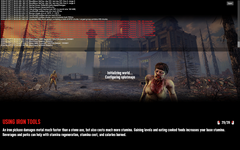
Please help. My screen has this code. I am new to the PC version so need more detail on how to fix this. Thank you!
 

Attachments

  • Screenshot (2).png
    Screenshot (2).png
    2.6 MB · Views: 2
Last edited:
Back
Top