Where a lake meets the shore, there are 10-20m wide strips of land where you can see down to bedrock because there is a gap in the world because the meshing of the water to the land is not done right. I have not fallen through these gaps in the land as there appears to be an invisible safety net that prevents that, but I cannot play multiplayer on a game where there are holes in the world all over the place that allow other players to exploit and see underground. I'm hoping this is something that is already being worked on?

You are using an out of date browser. It may not display this or other websites correctly.
You should upgrade or use an alternative browser.
You should upgrade or use an alternative browser.
Where water meets land, there are gaps in the world.
- Thread starter NewGuy
- Start date
Dead Smarty
Survivor
What map are you playing?
I've tried 6 RNG 8k maps so far and it occurs on all of them.What map are you playing?

Jost Amman
Hunter
@OP: are you sure your server is up to par with performance?
Maybe it's not powerful enough to render all stuff with more than one player.
Maybe it's not powerful enough to render all stuff with more than one player.
It's not a server, it's a SP game on a nice gaming laptop with only 1 player.@OP: are you sure your server is up to par with performance?
Maybe it's not powerful enough to render all stuff with more than one player.

bdubyah
Hunter
This seems to be something 2.5 either created or made worse.

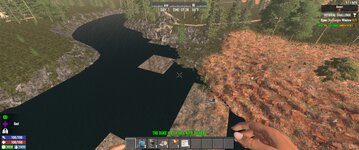
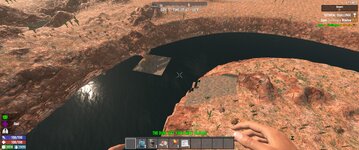
- bloodlust67
- Replies: 12
- Forum: Confirmed

Massive hole in the map that i could fall through, also smaller patches of map missing in water all in pine forest.
- Ayden-Kaine
- Replies: 4
- Forum: Confirmed
Jost Amman
Hunter
but I cannot play multiplayer on a game where there are holes in the world all over the place that allow other players to exploit and see underground.
Then why mention multiplayer?It's not a server, it's a SP game on a nice gaming laptop with only 1 player.

I'm confused.
I'm coming back from 2+ years of not playing. I'm seeing what's new on SP first before jumping into MP. I cannot play MP with these bugs/exploits as they are.Then why mention multiplayer?
I'm confused.
Post automatically merged:
Yup, those pics are what I'm seeing on all the maps I've created so far. Very inconsistent meshing between water and land and you can see down to bedrock.This seems to be something 2.5 either created or made worse.
- bloodlust67
- Replies: 12
- Forum: Confirmed
- Ayden-Kaine
- Replies: 4
- Forum: Confirmed
Here's a video showing what I'm seeing, and I'd like to add that now I am falling through the map on these areas whereas I was not in my previous brief testing.
This video link will expire in 2 days - https://streamable.com/ji6uct
This video link will expire in 2 days - https://streamable.com/ji6uct
Jost Amman
Hunter
I don't know why, but this is not happening to me (yet).Here's a video showing what I'm seeing, and I'd like to add that now I am falling through the map on these areas whereas I was not in my previous brief testing.
This video link will expire in 2 days - https://streamable.com/ji6uct
Did you generate the map you're playing on with the current (main) version?
Are you sure you didn't forget any mod installed that messes up with tiles/maps or anything graphical maybe?
Also, it would be helpful to have a screenshot of your graphic settings.
I don't know why, but this is not happening to me (yet).
Did you generate the map you're playing on with the current (main) version?
Are you sure you didn't forget any mod installed that messes up with tiles/maps or anything graphical maybe?
Also, it would be helpful to have a screenshot of your graphic settings.
As seen on the vid, it is v2.5(b23) running an 8k RWG seed name "January4th" at -1833, 35, 402. No mods installed. Some xmls have been edited, but nothing in regards to terrain or RWGmixer stuff. I tested without ANY xml edits just straight vanilla and it does the same thing. Various graphics settings have been used with no change to the glitching. Location of this glitch is at -

Riamus
Hunter
I also haven't seen this, but since others have, it's probably a bug. But if you want to do some testing with it, if you were to make your map available for others to download, they could go to the location you mentioned and see if there are problems there for them. That will help to determine if it's an issue on the specific map or with your graphics settings or computer or whatever.

4sheetzngeegles
Hunter
I did an rwg render for the first time in a long time, Yep it does it. I don't have any mods.
I tested it multiple times. It always happened in the same locations on the river water pngs.
To get rid of it I just destroyed an object on the border and it disappeared. Grass, a shrub,
a tree, a small stone.
Measured it, and it is always a 16X16 grid that is was affected, on my renders.
Does not happen on my custom maps, where I have natural water to fill in the terrain, in my water.xml
I will check my graphic settings now.
I tested it multiple times. It always happened in the same locations on the river water pngs.
To get rid of it I just destroyed an object on the border and it disappeared. Grass, a shrub,
a tree, a small stone.
Measured it, and it is always a 16X16 grid that is was affected, on my renders.
Does not happen on my custom maps, where I have natural water to fill in the terrain, in my water.xml
I will check my graphic settings now.
InfiniteWarrior
Hunter
Only thing I've run across are marshes that probably weren't intended to be marshes. Is that a good thing? Or not?

4sheetzngeegles
Hunter
That means the water table was either too high, or the color scheme for the water layout is off by height,Only thing I've run across are marshes that probably weren't intended to be marshes. Is that a good thing? Or not?
or that the land mass has been lowered a few blocks too low. Well at least that is what it use to mean,
most of those settings have been removed and according to a note in biomes, have been set to dynamically
render now. I saw it on one of these renders, and it was blank in areas, so I hit the edge of the water and it
fixed itself.
That's what I did at first and it worked, then I just clicked check stability and that worked, but you have to be closeLooks like some of the water and ground didn't render in properly, I would suggest just shooting the ground next to the void.
to the gap.
I turned water from low to high then back to low, turned off distant pois then back on mine is set at 2000, walked,
ran, flew to see if it was a delayed issue. Dm, and basic player.
Changed from center forest to center waste, maxed forest and rivers, returned to default.
commented out
<!-- <property class="forest_wilderness">
<property name="count" value="45, 90, 135"/>
</property> --> in rwg
The only thing I can say is after, 11 game starts and 11 different maps I am not that curious anymore.
Almost forgot I repainted the snake river, to see if that would possibly help, nope same thing.

Morloc
Arch Necromancer
It's more frequent near bodies of water, but I've had it pop up in the middle of a road within a wasteland city. My motocycle became trapped for a while in the void (which had solid spots here and there). It sort of stabilized itself and I was able to dig myself out, but the area was still pretty wonky.
4sheetzngeegles
Hunter
I did a another test. I didn't hit or move anything this time. All I did was approach elevated
until I could see the patch. then slowly moved back until the LOD changed for the spot and
it was corrected. So does water have an LOD grouping dunno. But it worked consistently, even
with the marsh land overlay.
Here are things I do know, there were 3 colors used for the water biome now there is only 1.
#0063ff water
#0064ff onlywater
#001234 underwater
PRIOR colors
now
#001234 underwater
Prior Alphas trees and objects and plants would conflict with water mesh, because of the air blocks.
Now water allows them. Water is now more fluid, vs solid. To test it move in water and release control
you will glide forward a bit, so friction has been reduced. Would be nice addition on an icy road.
Water level by default is 30 height. The stamps are acting like POIs, and not terrain. When creating a world
there is no water.xml file included. Normally water, when rendering fills any crevice 30 or less. That has been
removed from biomes.xml. The Blue to burgundy color used in the water stamps has been changed.
That's all I can remember for now.
until I could see the patch. then slowly moved back until the LOD changed for the spot and
it was corrected. So does water have an LOD grouping dunno. But it worked consistently, even
with the marsh land overlay.
Here are things I do know, there were 3 colors used for the water biome now there is only 1.
#0063ff water
#0064ff onlywater
#001234 underwater
PRIOR colors
now
#001234 underwater
Prior Alphas trees and objects and plants would conflict with water mesh, because of the air blocks.
Now water allows them. Water is now more fluid, vs solid. To test it move in water and release control
you will glide forward a bit, so friction has been reduced. Would be nice addition on an icy road.
Water level by default is 30 height. The stamps are acting like POIs, and not terrain. When creating a world
there is no water.xml file included. Normally water, when rendering fills any crevice 30 or less. That has been
removed from biomes.xml. The Blue to burgundy color used in the water stamps has been changed.
That's all I can remember for now.