
-
Mods are now organized as resources. Use the Mods link above to browse for or submit a mod, tool, or prefab.
The TFP Official Modding Forum Policy establishes the rules and guidelines for mod creators and mod users.
You are using an out of date browser. It may not display this or other websites correctly.
You should upgrade or use an alternative browser.
You should upgrade or use an alternative browser.
Resource icon
Khaine's V2 Modlets! (Bigger backpacks, HP bars, etc) 2025-06-16
No permission to download
- Thread starter KhaineGB
- Start date
ecksfiftyone
Refugee
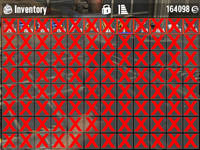
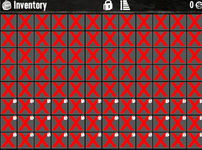
It seems bigger backpacks is broken with 2.2. Red X in every cell.
ecksfiftyone
Refugee
I fixed this by editing Config > XUI > Controls.xmlIt seems bigger backpacks is broken with 2.2. Red X in every cell.
I commented out
<sprite depth="9" name="cancel" sprite="ui_game_symbol_x" width="45" height="45" color="255,0,0,255" type="sliced" visible="false" foregroundlayer="true"/>If you are not familiar with comments: It's now this:
<!-- <sprite depth="9" name="cancel" sprite="ui_game_symbol_x" width="45" height="45" color="255,0,0,255" type="sliced" visible="false" foregroundlayer="true"/> -->ok I commented out that line and I am still broken...I fixed this by editing Config > XUI > Controls.xml
I commented out
<sprite depth="9" name="cancel" sprite="ui_game_symbol_x" width="45" height="45" color="255,0,0,255" type="sliced" visible="false" foregroundlayer="true"/>
If you are not familiar with comments: It's now this:
<!-- <sprite depth="9" name="cancel" sprite="ui_game_symbol_x" width="45" height="45" color="255,0,0,255" type="sliced" visible="false" foregroundlayer="true"/> -->
Red X everywhere.
figured it out
Not sure what changed, but when i logged in just now, this is what my pack looks like.KhaineGB submitted a new resource:
Khaine's V2 Modlets! (Bigger backpacks, HP bars, etc) - A collection of modlets i've maintained since A19
Read more about this resource...
Attachments
I fixed this by editing Config > XUI > Controls.xml
I commented out
<sprite depth="9" name="cancel" sprite="ui_game_symbol_x" width="45" height="45" color="255,0,0,255" type="sliced" visible="false" foregroundlayer="true"/>
If you are not familiar with comments: It's now this:
<!-- <sprite depth="9" name="cancel" sprite="ui_game_symbol_x" width="45" height="45" color="255,0,0,255" type="sliced" visible="false" foregroundlayer="true"/> -->
This fixed it for me! Nice!

Anabella
Refugee
Instead change the line toI fixed this by editing Config > XUI > Controls.xml
I commented out
<sprite depth="9" name="cancel" sprite="ui_game_symbol_x" width="45" height="45" color="255,0,0,255" type="sliced" visible="false" foregroundlayer="true"/>
If you are not familiar with comments: It's now this:
<!-- <sprite depth="9" name="cancel" sprite="ui_game_symbol_x" width="45" height="45" color="255,0,0,255" type="sliced" visible="false" foregroundlayer="true"/> -->
<sprite depth="9" name="cancel" sprite="ui_game_symbol_x" width="55" height="55" color="255,0,0,255" type="sliced" visible="{# ishovered and islocked}" foregroundlayer="true"/>
That matches up with the changes the devs made in the original xml file but keeps the mods changes.
Looks like the V2.2 update has "broken" the backpack mod. It still works, but there are big red "X"s over all of the inventory slots in the backpack.KhaineGB submitted a new resource:
Khaine's V2 Modlets! (Bigger backpacks, HP bars, etc) - A collection of modlets i've maintained since A19
Read more about this resource...
See the post directly above yours. It tells you exactly what to change to fix the red X issueLooks like the V2.2 update has "broken" the backpack mod. It still works, but there are big red "X"s over all of the inventory slots in the backpack.
Super! The 'X's are gone, "thank you", Anabella! but . . . (sigh) I have a small padlock icon sitting in the corner of the 4th row down, 6th slot across. It is also a smaller 'lock' icon than the lock icons which occur when you press the master 'Lock' control icon. It doesn't seem to impact anything I put in the slot, and the master 'Lock" control works fine on all the slots. Weird. I can't find a way to remove it thus far. Any ideas on this problem?
Thanks,
pj
Thanks,
pj
Last edited:
Fixed! With an item in the slot, I pressed the master Lock button and all slots showed an open lock icon, whereas my slot showed a closed lock icon. I simply clicked on it, it became 'open', I clicked the master 'Lock', and all lock icons disappeared, including my 'problem' icon. My 'problem' was in my head - never having used the lock function before. (I'm not even sure we had it in earlier versions of the game. . . duh)
Slot locking was added in 1.x. Technically it existed before and could be enabled with a simple xml change, but it was really basic. You could set a number of slots to lock and it started at top left and locked that many. The current system of locking individual slots is much better in my opinion. It does mean backpack mods can break though.
Hopefully Khaine will make old versions easier to find. There is a topic for his A20 mods in the archive section. The links you find will probably be flagged by your browser as malicious. If you know how to navigate github, you'll find the A20 mods at
https://github.com/KhaineGB/KhaineA20ModletsXML for the xml mods and
https://github.com/KhaineGB/KhaineA20ModletsHarmony for the harmony mods.
Meant to quote you so you got a notice.
https://github.com/KhaineGB/KhaineA20ModletsXML for the xml mods and
https://github.com/KhaineGB/KhaineA20ModletsHarmony for the harmony mods.
Post automatically merged:
Hello KhaineGB, do you still have somwhere your modlets for game version a20.7? I really need that
Meant to quote you so you got a notice.

