

JasonX
Refugee
EDIT: Found a typo in the code (added an extra > resolved by the suggestion to check the mod generated configs.
Hi all,
Added a new light recipe to the game using an existing model/icon.
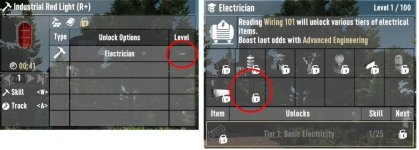
WITHOUT COMMA: When I use the following append, the skill requirement and tracking pages are borked per image 1
<!-- add electrical recipes to unlock code -->
<append xpath="/progression/crafting_skills/crafting_skill[@name='craftingElectrician']/display_entry[@name_key='electricianT1']/unlock_entry/@item">,HadeslightIndustrialRed></append>
<append xpath="/progression/crafting_skills/crafting_skill[@name='craftingElectrician']/effect_group/passive_effect[@level='25,100']/@tags">,HadeslightIndustrialRed></append>
WITH COMMA: When I add a comma (,) to the value, they appear correctly but there is now a ghost item added to the tracking page per image 2
<!-- add electrical recipes to unlock code -->
<append xpath="/progression/crafting_skills/crafting_skill[@name='craftingElectrician']/display_entry[@name_key='electricianT1']/unlock_entry/@item">,HadeslightIndustrialRed,></append>
<append xpath="/progression/crafting_skills/crafting_skill[@name='craftingElectrician']/effect_group/passive_effect[@level='25,100']/@tags">,HadeslightIndustrialRed,></append>

resolved by the suggestion to check the mod generated configs.Hi all,
Added a new light recipe to the game using an existing model/icon.
WITHOUT COMMA: When I use the following append, the skill requirement and tracking pages are borked per image 1
<!-- add electrical recipes to unlock code -->
<append xpath="/progression/crafting_skills/crafting_skill[@name='craftingElectrician']/display_entry[@name_key='electricianT1']/unlock_entry/@item">,HadeslightIndustrialRed></append>
<append xpath="/progression/crafting_skills/crafting_skill[@name='craftingElectrician']/effect_group/passive_effect[@level='25,100']/@tags">,HadeslightIndustrialRed></append>
WITH COMMA: When I add a comma (,) to the value, they appear correctly but there is now a ghost item added to the tracking page per image 2
<!-- add electrical recipes to unlock code -->
<append xpath="/progression/crafting_skills/crafting_skill[@name='craftingElectrician']/display_entry[@name_key='electricianT1']/unlock_entry/@item">,HadeslightIndustrialRed,></append>
<append xpath="/progression/crafting_skills/crafting_skill[@name='craftingElectrician']/effect_group/passive_effect[@level='25,100']/@tags">,HadeslightIndustrialRed,></append>
Last edited by a moderator:


