ChaseC
Refugee
- Version
- 3.0
- Platform
- Windows
Ever since 3.0 came out, the Xbox App PC version of the game started getting constant complaint from the console when entering to main menu with "
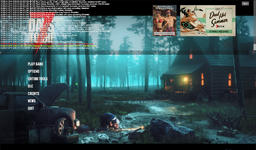
IndexOutOfRangeException: Index was outside the bounds of the array." which in Unity usually means something is not scaled correctly in the game and since this happens every time in main menu it seems scaling or some scaling setting conflicts with the Xbox App version of the game and I tried many fixes myself but so far nothing worked so I report this issue here. This issue is also pretty critical as because of this I cannot exit my game saves properly and I always need to alt f4 or force the game closing every time I exit the save as the same error message appears when I try to exit to main menu but the game will never make it to main menu instead throws the error and then freezes the game until I force the closure of the game. This also could be a Microsoft Windows issue but I still send the report here first if you could give a look and fix it and if needed we can report this to Microsoft as well. I will thank for your help. I left a screenshot of the issue here and a log about it from pastebin.
IndexOutOfRangeException: Index was outside the bounds of the array." which in Unity usually means something is not scaled correctly in the game and since this happens every time in main menu it seems scaling or some scaling setting conflicts with the Xbox App version of the game and I tried many fixes myself but so far nothing worked so I report this issue here. This issue is also pretty critical as because of this I cannot exit my game saves properly and I always need to alt f4 or force the game closing every time I exit the save as the same error message appears when I try to exit to main menu but the game will never make it to main menu instead throws the error and then freezes the game until I force the closure of the game. This also could be a Microsoft Windows issue but I still send the report here first if you could give a look and fix it and if needed we can report this to Microsoft as well. I will thank for your help. I left a screenshot of the issue here and a log about it from pastebin.
- Reproduction Steps
- The game has issues with Main Menu likely with UI scaling and the issue so far happens in Xbox PC Version of the game which also prevents exiting a game save without needing to alt f4 the game. Fixing this would be very important. This likely could be Microsoft's fault as well but I report this here first.
- Link to Logs
- https://pastebin.com/7Epmc5iF
- Link to Screenshot/Video
- https://imgur.com/a/RsASx1s