• Mods are now organized as resources. Use the Mods link above to browse for or submit a mod, tool, or prefab.

    The TFP Official Modding Forum Policy establishes the rules and guidelines for mod creators and mod users.

WalkerSim2

WalkerSim2 0.9.16

No permission to download
I think I figured out a cause of the digging, From what it looks like sounds travel straight through blocks and dirt so the Zombies hear when we are at bedrock or like when I was indoors in a Vanity Tower POI on the 4th or 5th floor wrenching, zombies down at the street level heard me and came looking.
If the mod could check for the shelter status and dampen sound emitted by a configureable value it could probably fix this, I absolutely love outdoors to see zombies hearing gunshots and honing in, but it does feel weird when indoors that small sounds still travel out so far.

And yes, LCB do indeed stop spawing, they changed that a couple of alphas ago (Or rather it's stopping sleepervolumezombies from re-spawning) But we get walkersim agents roaming straight past walls and spikes and turns to zombies inside our base when we come near which is what I'd like to prevent.

As far as I gathered from other posts regular world zombies can spawn only on terrain blocks (voxelblocks) which does seems to be the case when I have been testing, and also respects the 'canMobsSpawnOn' xml tag for the block.
Does walkersim respect that tag aswell when turning agents to spawned zombies? If it does then I can mod in zombiespawnproof terrain blocks to place inside the walls to actually have a point with the walls and spikes ^^
(how does it handle bedroll safezone for that situation?)
I have made terrainblocks with canMobSpawnOn=False and replaced the perimeter of a crypt POI which have suppressed normal vanilla spawns for some 50 ingame days when I had walkersim disabled due to the issues, But when I re-enabled it yesterday it only took a day or two before a zombie magically was inside the spiked walls, :(
 
ZehMatt updated WalkerSim2 with a new update entry:

0.9.12

Release of 0.9.12
  • Fix: Zombies digging should be fixed, hopefully.
  • Fix: Editor crash when supplying bad inputs.
  • Fix: Sound events that have no instigator were ignored, ex.: falling trees now emit an event.
  • Improve: Resizing the editor will now resize most elements accordingly.
  • Improve: Agents that intersect with world/sound events will be no in an alert state for 30 seconds, when they spawn they will continue to be alert and chase to the location.
  • Feature: Each...

Read the rest of this update entry...
 
ZehMatt updated WalkerSim2 with a new update entry:

0.9.14

This version adds support for game version 2.5, will not work with older game versions.

Changelog
  • Improved: The provided WalkerSim.xml has now all groups set `PostSpawnWanderSpeed` to `Walk` for consistency.
  • Feature: Added `SoundDistanceScale`, this can control the distance to how far sounds reach, 1.0 is default, 0.5 would be half the distance.
  • Change: Support for the new 2.5 version of the game.
  • Change: Decreased population density from 200 to 180 in the provided...

Read the rest of this update entry...
 
Not sure what i am seeing here . the mod is being a little bullish to run , This is on a dedicated server btw.
2025-12-22T09:24:49 54.552 ERR [MODS] Error while executing ModEvent "GameStartDone" on mod "WalkerSim"
2025-12-22T09:24:49 54.558 EXC Invalid path
at System.IO.Path.GetDirectoryName (System.String path) [0x0000d] in <1071a2cb0cb3433aae80a793c277a048>:0
at WalkerSim.WalkerSimMod.LoadConfiguration () [0x00073] in <b459ca9213aa48d097a53dfb96e4c1eb>:0
at WalkerSim.WalkerSimMod.ResetSimulation () [0x0004a] in <b459ca9213aa48d097a53dfb96e4c1eb>:0
at WalkerSim.WalkerSimMod.InitializeSimulation () [0x0019e] in <b459ca9213aa48d097a53dfb96e4c1eb>:0
at WalkerSim.WalkerSimMod.GameStartDone (ModEvents+SGameStartDoneData& data) [0x00021] in <b459ca9213aa48d097a53dfb96e4c1eb>:0
at ModEvents+ModEvent`1[TData].Invoke (TData& _data) [0x00016] in <036aa33de93148cfa14fd53ce48d7b23>:0
UnityEngine.StackTraceUtility:ExtractStringFromException(Object)
Log:Exception(Exception)
 
ZehMatt updated WalkerSim2 with a new update entry:

0.9.15

This fixes a bug for dedicated servers throwing an error on startup, some performance improvements.

Changelog
  • Fix: Dedicated servers not getting the file location for the mod causing an error on startup.
  • Improve: Some performance optimizations.
  • Improve: Some of the documentation has been rewritten and re-organized.

Read the rest of this update entry...
Post automatically merged:

Server is at latest version and that was using the mos update you released roday
The latest version should fix it.
 
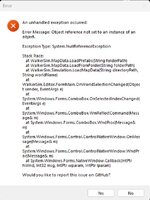
ZehMatt, Thank you! all is working! my server is back to a beautiful mess of zombies again. One last thing, in the WalkerSim-Editor.exe it does throw an error that does not seem to hurt anything.

Screenshot 2025-12-24 112553.jpg
 
ZehMatt, Thank you! all is working! my server is back to a beautiful mess of zombies again. One last thing, in the WalkerSim-Editor.exe it does throw an error that does not seem to hurt anything.

View attachment 37860
How can I reproduce this? All fine on my end, the stack trace suggests it can't load the Prefabs data, I can only guess at this point so it would be good if I know how to reproduce this error.
 
How can I reproduce this? All fine on my end, the stack trace suggests it can't load the Prefabs data, I can only guess at this point so it would be good if I know how to reproduce this error.
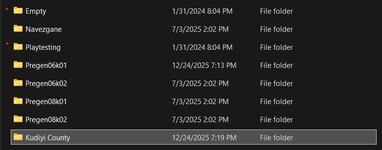
Sure thing , if i open the application , all is good until i click on the pull down for world , the prefabs seem ok , but "empty" or "playtesting" and my world it will throw this error. -snip-

Update: after a bit of playing around i realized i had the wrong files in place for the map. the error seems to start at prefabs.xml . Or the lack of one. I moved a prefabs.xml from another map for science and saw the error changed. I also looked into the created map, i saw that it was a completely my lack of coffee moment and I must of moved the save and not the world. I moved the world to the right folder and it loaded just fine . it was just an error caused on my part.

So any selection in worlds without a prefab.xml will error out . So any world that does not have a prefab.xml will cause that error.

So the error was me not paying attention !

Screenshot 2025-12-24 193838.jpg

Screenshot 2025-12-24 193005.jpg
 

Attachments

  • Screenshot 2025-12-24 193838.jpg
    Screenshot 2025-12-24 193838.jpg
    40.5 KB · Views: 0
Sure thing , if i open the application , all is good until i click on the pull down for world , the prefabs seem ok , but "empty" or "playtesting" and my world it will throw this error. -snip-

Update: after a bit of playing around i realized i had the wrong files in place for the map. the error seems to start at prefabs.xml . Or the lack of one. I moved a prefabs.xml from another map for science and saw the error changed. I also looked into the created map, i saw that it was a completely my lack of coffee moment and I must of moved the save and not the world. I moved the world to the right folder and it loaded just fine . it was just an error caused on my part.

So any selection in worlds without a prefab.xml will error out . So any world that does not have a prefab.xml will cause that error.

So the error was me not paying attention !

View attachment 37866

View attachment 37864
I appreciate the testing! I will add some safety measures for this scenario.
 
Back
Top