LittleRedSonja
Survivor
- Version
- 3.0.0, build b252
- Platform
- Windows
Hi!
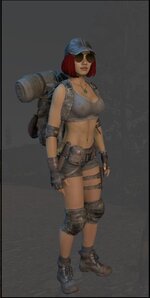
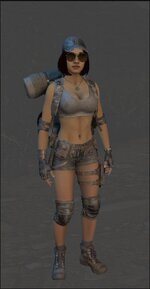
Like the title says, the character is missing proper lighting in both the Character preview window (within the Inventory) and the Cosmetic window. This issue is entirely new to 3.0; it worked flawlessly back in 2.6.
I have attached a picture taken in 2.6 vs. another one in 3.0. As you can see, not only is the skin completely starved of light, but even the hair appears black when the character is, of course, a redhead . Interestingly, in-world lighting looks perfectly fine in both versions, whether you are in first-person or third-person view.
I have not dug completely into the problem yet, but I am guessing it might be because SDCSUtils.CreateVizUI is missing a baseRigUI.AddComponent<UpdateLightOnPlayers>() call; however, this is just a guess.
I hope this helps!
Like the title says, the character is missing proper lighting in both the Character preview window (within the Inventory) and the Cosmetic window. This issue is entirely new to 3.0; it worked flawlessly back in 2.6.
I have attached a picture taken in 2.6 vs. another one in 3.0. As you can see, not only is the skin completely starved of light, but even the hair appears black when the character is, of course, a redhead
. Interestingly, in-world lighting looks perfectly fine in both versions, whether you are in first-person or third-person view.I have not dug completely into the problem yet, but I am guessing it might be because SDCSUtils.CreateVizUI is missing a baseRigUI.AddComponent<UpdateLightOnPlayers>() call; however, this is just a guess.
I hope this helps!
- Reproduction Steps
- Start the game and equip any armor, ideally one with exposed skin or skin-proxies. Open the inventory window or the Cosmetic window. It is particularly evident if the character has any hair color other than jet black or very dark brown.
- Link to Logs
- https://pastebin.com/P7zvp0Ws
- Link to Screenshot/Video
- https://i.postimg.cc/4dqgrzk3/Preview-3-0.jpg