

K_3_F_1_R
Refugee
- Version
- 3.0
- Platform
- Windows
Version: V3.0.0 (b252)
Steps to Reproduce:
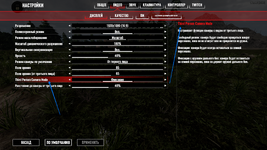
The setting name is displayed in English ("Third Person Camera Mode"), while the description on the right side is already translated into Russian.
Expected Result:
The setting name should be localized to match the selected language, just like its description.
Additional Information:
This appears to be a partial localization issue where the setting description is translated, but the setting title remains in English.
Steps to Reproduce:
- Open Settings.
- Navigate to Video → Display.
- Locate the Third Person Camera Mode setting.
The setting name is displayed in English ("Third Person Camera Mode"), while the description on the right side is already translated into Russian.
Expected Result:
The setting name should be localized to match the selected language, just like its description.
Additional Information:
This appears to be a partial localization issue where the setting description is translated, but the setting title remains in English.
- Reproduction Steps
- ---
- Link to Logs
- https://thereisno.link/
- Link to Screenshot/Video
- https://thereisno.link/
