Linux Steam Deck and 2.5 Performance issues

Been playing this on my Steam Deck for many versions, and it usually runs really well if I keep the settings reasonable.

Tried 2.5 last night for the first time and I am having major FPS drops that sort of build over time to the point where it is running at about 8 FPS on all low settings. Restarting and loading in will be fine for a bit, but it happens pretty quickly (within a few minutes) that I will be back down again.

Anyone else experiencing this with their Steam Deck?
 
It seems to come and go too, like drops to sub 10 FPS every few minutes… then jumps back up to solid 30 (probably higher, but that is what I lock it too).
 
Console players and even some players on PC report FPS being lower and rubber-banding problems when driving around. But TFP staff surely is out of office right now. Info from TFP is unlikely for at least another week. And a patch that could fix any bugs will take time.
 
Been playing this on my Steam Deck for many versions, and it usually runs really well if I keep the settings reasonable.

Tried 2.5 last night for the first time and I am having major FPS drops that sort of build over time to the point where it is running at about 8 FPS on all low settings. Restarting and loading in will be fine for a bit, but it happens pretty quickly (within a few minutes) that I will be back down again.

Anyone else experiencing this with their Steam Deck?
No idea if this will help you on Steam Deck, but my fps dropped on my linux pc drastically from V2.4 to V2.5. I selected the Launcher/Tools/Clean game data menu and cleaned the Game settings and Player profiles, which brought my FPS back to normal. I had to make a new toon, but didn't lose any progress.
 
No idea if this will help you on Steam Deck, but my fps dropped on my linux pc drastically from V2.4 to V2.5. I selected the Launcher/Tools/Clean game data menu and cleaned the Game settings and Player profiles, which brought my FPS back to normal. I had to make a new toon, but didn't lose any progress.
Well, I tried it and no luck. I thought it might have worked - but then after a few minutes, started doing it again.
 
2.5 just seems to chug more than 2.4 did. I've noticed just putting around in my vehicles seems a lot more choppy than I remember 2.4 being. Others have said the same.
 
2.5 just seems to chug more than 2.4 did. I've noticed just putting around in my vehicles seems a lot more choppy than I remember 2.4 being. Others have said the same.
They must have changed something significant that is causing these performance issues.
 
I'm having similar issues on my system running Arch Linux (not a SteamDeck).
OS: 6.18.2-arch2-1
CPU: Intel(R) Core(TM) i9-10900K CPU @ 3.70GHz
GPU: NVidia GeForce RTX 3080
GPU Driver Version: 590.48.01

I am using Vulkan, as the OpenGL renderer has the issue that some textures don't render correctly and I just get all black, similar to this post:
https://community.thefunpimps.com/threads/trader-rekit-not-rendering-correctly-on-linux.46178/

When I first load in, everything runs fine and I cap out around 60fps (based on the Steam overlay). This lasts for a while, but I will start to notice my frame rates dropping, after a day or two of game time, I will be hovering below 30fps with really busy areas dropping further. I can close the game out completely and the frame rates return to normal, but will slowly fall again over time. If I only drop to the main menu, but don't close out the game completely, the issue does not seem to be resolved.

It feels a lot like a memory leak, but I haven't had a chance to try and capture resource usage.
 
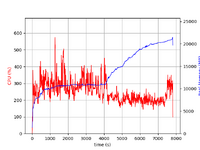
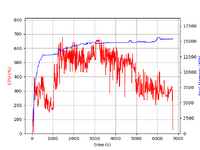
Now that I am watching for it, I've noticed that the problem seems to show up when activating a mission. As soon as I or my partner activate the flag for a mission, my frame rates take a significant hit. During out last play session, I took some trace logs of CPU and memory usage, and as I expected, memory usage shot way up. This recording starts shortly after I start the game. I then connected to the server (dedicated server running on a separate system). Memory usage is fairly stable until ~4000 seconds when it jumps significantly, then there is a second jump around 5000. Memory is in MB, not sure why psrecord chopped the images the way it did.

7d2d_plot_1.png


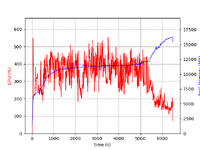
In a second capture, we spent a lot of time running around, gathering resources (mining) and my FPS stayed stable for a long time. And then we did a mission:
7d2d_plot_2.png

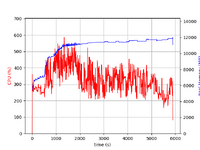
For comparison, the first recording I made was during a blood moon, and performance was fairly stable before, during and after the blood moon. This shocked me a bit originally and is why I started watching for something else to kick it off. Memory usage gets up to a fairly stable state and stays that way until I exited the game. It also never gets as high as in the other plots.

7d2d_plot_0.png

I have the both the raw data and 7d2d game output log files associated with these captures and would be happy to share those as well, but I'm not seeing a way to attach those to this post.

Grabbing a snippet which seems relevant:

Code:
2026-01-11T16:34:08 5010.770 INF Time: 83.41m FPS: 49.35 Heap: 2474.4MB Max: 2736.4MB Chunks: 313 CGO: 222 Ply: 2 Zom: 0 Ent: 20 (85) Items: 3 CO: 1 RSS: 11711.7MB
2026-01-11T16:34:22 5025.100 INF Player Name WeatherBuffUpdate , indoors False
2026-01-11T16:34:38 5040.866 INF Time: 83.91m FPS: 57.05 Heap: 2284.0MB Max: 2736.4MB Chunks: 313 CGO: 215 Ply: 2 Zom: 0 Ent: 18 (83) Items: 0 CO: 1 RSS: 11944.5MB
Unloading 2 Unused Serialized files (Serialized files now loaded: 145)
2026-01-11T16:34:49 5052.372 INF UnloadUnusedAssets after 20.08808 m, took 0 ms
Unloading 2955 unused Assets to reduce memory usage. Loaded Objects now: 681442.
Total: 575.789242 ms (FindLiveObjects: 45.090894 ms CreateObjectMapping: 15.508452 ms MarkObjects: 511.401629 ms  DeleteObjects: 3.787752 ms)

2026-01-11T16:35:08 5071.138 INF Time: 84.41m FPS: 58.79 Heap: 2555.9MB Max: 2736.4MB Chunks: 313 CGO: 215 Ply: 2 Zom: 0 Ent: 19 (90) Items: 0 CO: 1 RSS: 11957.9MB
2026-01-11T16:35:38 5101.152 INF Time: 84.91m FPS: 58.98 Heap: 2522.9MB Max: 2736.4MB Chunks: 313 CGO: 215 Ply: 2 Zom: 0 Ent: 19 (95) Items: 1 CO: 1 RSS: 11750.4MB
2026-01-11T16:36:08 5131.169 INF Time: 85.42m FPS: 58.42 Heap: 2612.5MB Max: 2736.4MB Chunks: 313 CGO: 210 Ply: 2 Zom: 0 Ent: 13 (101) Items: 0 CO: 1 RSS: 11786.1MB
2026-01-11T16:36:13 5136.434 INF SectionType change from None to Suspense
2026-01-11T16:36:13 5136.434 INF Loading new config for Suspense...
2026-01-11T16:36:13 5136.434 INF Played Suspense
2026-01-11T16:36:13 5136.434 INF Fading in Suspense
2026-01-11T16:36:13 5136.434 INF Notified SectionSelector that music played
2026-01-11T16:36:13 5136.456 INF Loading new ClipSets for Suspense...
2026-01-11T16:36:14 5136.520 INF Suspense loaded new config and clipsets
2026-01-11T16:36:16 5139.452 INF fadeInCo complete on Suspense
2026-01-11T16:36:27 5150.202 INF 302735+1 Origin Reposition (1392.0, 32.0, 624.0) to (1424.0, 32.0, 352.0)
2026-01-11T16:36:35 5157.585 INF SectionType change from Suspense to Exploration
2026-01-11T16:36:35 5157.585 INF Fading out Suspense
2026-01-11T16:36:35 5157.585 INF Loading new config for Exploration...
2026-01-11T16:36:35 5157.585 INF Played Exploration
2026-01-11T16:36:35 5157.585 INF Fading in Exploration
2026-01-11T16:36:35 5157.606 INF Loading new ClipSets for Exploration...
2026-01-11T16:36:35 5157.802 INF Exploration loaded new config and clipsets
2026-01-11T16:36:38 5160.618 INF Paused Suspense
2026-01-11T16:36:38 5160.618 INF fadeInCo complete on Exploration
2026-01-11T16:36:38 5161.169 INF Time: 85.92m FPS: 60.02 Heap: 2510.1MB Max: 2736.4MB Chunks: 313 CGO: 190 Ply: 2 Zom: 0 Ent: 5 (101) Items: 0 CO: 1 RSS: 12098.7MB
Vulkan - Suboptimal memory type used for image because of low memory


The "Vulkan - Suboptimal memory type used for image because of low memory" line repeats thousands of times in each log.
 
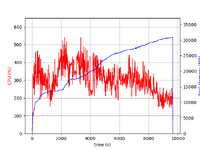
Continuing to troubleshoot, I decided to also track GPU utilization during a session. In the session tracked, we took a mission an an Army Post in the Wasteland biome and completed it over the course of a couple in-game days (yes, we move slow). Here is the psrecord plot:

7d2d_plot_2026-01-15_21:38:56_+0000.png

In the command line I used to start the recording, I captured the timestamp for when the recording started. This started at 21:38:56 UTC. The first jump in memory happens around the 2100 second mark, which would be about 22:13:00 UTC.

Looking in the output log around that time (output log is is using local time, so UTC-5):

Code:
2026-01-15T17:01:29 1368.284 INF Player Name onNewBiomeEntered -buffForest_Hazard
2026-01-15T17:01:29 1368.284 INF Player Name onNewBiomeEntered +buffWasteland_Hazard
2026-01-15T17:01:29 1368.284 INF Player Name WeatherStatusTick default to default
2026-01-15T17:01:29 1368.284 INF Player Name WeatherBuffUpdate , indoors False
2026-01-15T17:01:29 1368.353 INF SectionType change from Exploration to Suspense
2026-01-15T17:01:29 1368.353 INF Fading out Exploration
2026-01-15T17:01:29 1368.353 INF Unpaused Suspense
2026-01-15T17:01:29 1368.353 INF Fading in Suspense
2026-01-15T17:01:32 1371.370 INF Paused Exploration
2026-01-15T17:01:32 1371.370 INF fadeInCo complete on Suspense
2026-01-15T17:01:48 1387.749 INF 80907+1 Origin Reposition (-624.0, 32.0, -976.0) to (-784.0, 32.0, -1200.0)
2026-01-15T17:01:52 1391.502 INF Mixer IsFinished: True
 AudioSource is not playing: False
 IsPaused: False
 IsPlaying: True
2026-01-15T17:01:52 1391.506 INF Stopped Suspense
2026-01-15T17:01:52 1391.506 INF unloaded ClipSets on Suspense
2026-01-15T17:01:52 1391.533 INF Notified SectionSelector that music stopped
2026-01-15T17:01:52 1391.533 INF SectionType change from Suspense to None
2026-01-15T17:01:54 1393.150 INF Time: 23.09m FPS: 60.02 Heap: 2739.6MB Max: 2764.8MB Chunks: 331 CGO: 204 Ply: 2 Zom: 0 Ent: 4 (72) Items: 3 CO: 1 RSS: 13572.8MB
2026-01-15T17:02:02 1401.803 INF Refresh Vehicle Position Waypoint 15858 False
SDCSUtils::RemoveFPViewObstructingGearPolygons -> Removed 19499 obstructing polygons from body(Clone)
SDCSUtils::RemoveFPViewObstructingGearPolygons -> hands_A(Clone) has no obstructing polygons
SDCSUtils::RemoveFPViewObstructingGearPolygons -> Removed 1648 obstructing polygons from feet_A(Clone)
2026-01-15T17:02:24 1423.168 INF Time: 23.59m FPS: 59.59 Heap: 2463.5MB Max: 2764.8MB Chunks: 331 CGO: 219 Ply: 2 Zom: 0 Ent: 8 (45) Items: 0 CO: 1 RSS: 13573.4MB
2026-01-15T17:02:32 1431.406 INF Stopped Exploration
2026-01-15T17:02:32 1431.406 INF fadeOutCo complete on Exploration
2026-01-15T17:02:32 1431.406 INF Mixer IsFinished: False
 AudioSource is not playing: True
 IsPaused: False
 IsPlaying: False
2026-01-15T17:02:32 1431.406 INF unloaded ClipSets on Exploration
2026-01-15T17:02:54 1453.186 INF Time: 24.09m FPS: 60.00 Heap: 2522.8MB Max: 2764.8MB Chunks: 331 CGO: 218 Ply: 2 Zom: 0 Ent: 8 (46) Items: 0 CO: 1 RSS: 13573.2MB
2026-01-15T17:03:10 1469.220 INF 85776+0 Origin Reposition (-784.0, 32.0, -1200.0) to (-576.0, 48.0, -1360.0)
2026-01-15T17:03:24 1483.187 INF Time: 24.59m FPS: 60.05 Heap: 2467.8MB Max: 2764.8MB Chunks: 331 CGO: 176 Ply: 2 Zom: 0 Ent: 6 (54) Items: 0 CO: 1 RSS: 13582.0MB
2026-01-15T17:03:35 1494.722 INF 87298+0 Origin Reposition (-576.0, 48.0, -1360.0) to (-384.0, 48.0, -1536.0)
SDCSUtils::RemoveFPViewObstructingGearPolygons -> Removed 19499 obstructing polygons from body(Clone)
SDCSUtils::RemoveFPViewObstructingGearPolygons -> hands_A(Clone) has no obstructing polygons
SDCSUtils::RemoveFPViewObstructingGearPolygons -> Removed 1648 obstructing polygons from feet_A(Clone)
2026-01-15T17:03:54 1513.201 INF Time: 25.09m FPS: 59.58 Heap: 2662.0MB Max: 2764.8MB Chunks: 331 CGO: 170 Ply: 2 Zom: 0 Ent: 8 (67) Items: 0 CO: 1 RSS: 13586.3MB
SDCSUtils::RemoveFPViewObstructingGearPolygons -> Removed 19499 obstructing polygons from body(Clone)
SDCSUtils::RemoveFPViewObstructingGearPolygons -> hands_A(Clone) has no obstructing polygons
SDCSUtils::RemoveFPViewObstructingGearPolygons -> Removed 1648 obstructing polygons from feet_A(Clone)
SDCSUtils::RemoveFPViewObstructingGearPolygons -> Removed 19499 obstructing polygons from body(Clone)
SDCSUtils::RemoveFPViewObstructingGearPolygons -> hands_A(Clone) has no obstructing polygons
SDCSUtils::RemoveFPViewObstructingGearPolygons -> Removed 1648 obstructing polygons from feet_A(Clone)
2026-01-15T17:04:24 1543.220 INF Time: 25.59m FPS: 60.01 Heap: 2540.8MB Max: 2764.8MB Chunks: 331 CGO: 169 Ply: 2 Zom: 0 Ent: 14 (74) Items: 0 CO: 1 RSS: 13595.5MB
2026-01-15T17:04:54 1573.235 INF Time: 26.09m FPS: 60.00 Heap: 2592.2MB Max: 2764.8MB Chunks: 331 CGO: 192 Ply: 2 Zom: 0 Ent: 7 (81) Items: 0 CO: 1 RSS: 13601.8MB
SDCSUtils::RemoveFPViewObstructingGearPolygons -> Removed 19499 obstructing polygons from body(Clone)
SDCSUtils::RemoveFPViewObstructingGearPolygons -> hands_A(Clone) has no obstructing polygons
SDCSUtils::RemoveFPViewObstructingGearPolygons -> Removed 1648 obstructing polygons from feet_A(Clone)
2026-01-15T17:05:04 1583.584 INF SectionType change from None to Suspense
2026-01-15T17:05:04 1583.584 INF Loading new config for Suspense...
2026-01-15T17:05:04 1583.584 INF Played Suspense
2026-01-15T17:05:04 1583.584 INF Fading in Suspense
2026-01-15T17:05:04 1583.584 INF Notified SectionSelector that music played
2026-01-15T17:05:04 1583.602 INF Loading new ClipSets for Suspense...
2026-01-15T17:05:04 1583.722 INF Suspense loaded new config and clipsets
2026-01-15T17:05:07 1586.602 INF fadeInCo complete on Suspense
2026-01-15T17:05:24 1603.238 INF Time: 26.59m FPS: 59.98 Heap: 2603.0MB Max: 2764.8MB Chunks: 331 CGO: 199 Ply: 2 Zom: 0 Ent: 14 (90) Items: 1 CO: 1 RSS: 13576.2MB
2026-01-15T17:05:54 1633.251 INF Time: 27.09m FPS: 59.97 Heap: 2673.2MB Max: 2764.8MB Chunks: 331 CGO: 204 Ply: 2 Zom: 0 Ent: 16 (98) Items: 3 CO: 1 RSS: 13571.4MB
2026-01-15T17:06:24 1663.253 INF Time: 27.59m FPS: 60.06 Heap: 2476.6MB Max: 2764.8MB Chunks: 331 CGO: 205 Ply: 2 Zom: 0 Ent: 16 (96) Items: 1 CO: 1 RSS: 13605.9MB
2026-01-15T17:06:54 1693.269 INF Time: 28.09m FPS: 59.99 Heap: 2539.9MB Max: 2764.8MB Chunks: 331 CGO: 205 Ply: 2 Zom: 0 Ent: 15 (98) Items: 2 CO: 1 RSS: 13616.9MB
2026-01-15T17:06:58 1697.636 INF Player Name WeatherStatusTick default to rainheavy
2026-01-15T17:06:58 1697.636 INF Player Name WeatherBuffUpdate , indoors False
2026-01-15T17:07:24 1723.270 INF Time: 28.59m FPS: 60.02 Heap: 2615.4MB Max: 2764.8MB Chunks: 331 CGO: 205 Ply: 2 Zom: 0 Ent: 15 (100) Items: 2 CO: 1 RSS: 13617.4MB
2026-01-15T17:07:52 1751.387 INF Mixer IsFinished: True
 AudioSource is not playing: False
 IsPaused: False
 IsPlaying: True
2026-01-15T17:07:52 1751.387 INF Stopped Suspense
2026-01-15T17:07:52 1751.387 INF unloaded ClipSets on Suspense
2026-01-15T17:07:52 1751.435 INF Notified SectionSelector that music stopped
2026-01-15T17:07:52 1751.435 INF SectionType change from Suspense to None
2026-01-15T17:07:54 1753.285 INF Time: 29.09m FPS: 58.01 Heap: 2463.6MB Max: 2764.8MB Chunks: 331 CGO: 205 Ply: 2 Zom: 0 Ent: 12 (101) Items: 4 CO: 1 RSS: 13623.4MB
2026-01-15T17:08:24 1783.301 INF Time: 29.59m FPS: 60.01 Heap: 2655.5MB Max: 2764.8MB Chunks: 331 CGO: 212 Ply: 2 Zom: 0 Ent: 5 (104) Items: 4 CO: 1 RSS: 13705.1MB
2026-01-15T17:08:45 1804.151 INF 105754+0 Origin Reposition (-384.0, 48.0, -1536.0) to (-656.0, 48.0, -1552.0)
2026-01-15T17:08:54 1813.305 INF Time: 30.09m FPS: 58.75 Heap: 2596.2MB Max: 2764.8MB Chunks: 331 CGO: 208 Ply: 2 Zom: 0 Ent: 4 (113) Items: 4 CO: 1 RSS: 13743.6MB
SDCSUtils::RemoveFPViewObstructingGearPolygons -> Removed 19499 obstructing polygons from body(Clone)
SDCSUtils::RemoveFPViewObstructingGearPolygons -> hands_A(Clone) has no obstructing polygons
SDCSUtils::RemoveFPViewObstructingGearPolygons -> Removed 1648 obstructing polygons from feet_A(Clone)
2026-01-15T17:09:24 1843.318 INF Time: 30.59m FPS: 53.76 Heap: 2937.7MB Max: 2937.7MB Chunks: 331 CGO: 218 Ply: 2 Zom: 0 Ent: 21 (136) Items: 4 CO: 1 RSS: 13883.7MB
2026-01-15T17:09:54 1873.322 INF Time: 31.09m FPS: 59.60 Heap: 2513.8MB Max: 2937.7MB Chunks: 331 CGO: 216 Ply: 2 Zom: 0 Ent: 26 (87) Items: 0 CO: 1 RSS: 13934.7MB
Vulkan - Suboptimal memory type used for image because of low memory
2026-01-15T17:10:06 1885.188 INF SectionType change from None to Combat
2026-01-15T17:10:06 1885.188 INF Loading new config for Combat...
2026-01-15T17:10:06 1885.188 INF Played Combat
2026-01-15T17:10:06 1885.188 INF Fading in Combat
2026-01-15T17:10:06 1885.188 INF Notified SectionSelector that music played
2026-01-15T17:10:06 1885.205 INF Loading new ClipSets for Combat...
2026-01-15T17:10:06 1885.422 INF Combat loaded new config and clipsets
Vulkan - Suboptimal memory type used for image because of low memory
2026-01-15T17:10:09 1888.205 INF fadeInCo complete on Combat

The "Vulkan - Suboptimal memory type used for image because of low memory" line is repeated tens of thousands of times in the rest of the log. Frame rates dropped over time, to the point that I finished up seeing mid to high teens. One later example from the output log:

Code:
2026-01-15T19:11:00 9139.751 INF Time: 152.17m FPS: 20.40 Heap: 2524.6MB Max: 2937.7MB Chunks: 331 CGO: 193 Ply: 2 Zom: 0 Ent: 2 (199) Items: 18 CO: 1 RSS: 30490.5MB

Continued in next post, I hit the 10,000 character limit...
 
I also captured the state of the GPU during this session using gpustat. Sadly, this doesn't create the pretty plot psrecord does, nor does it record timestamps (I may see if I can rework the command I am using to force that in next time). But, with gpustat being started with the same script as psrecord, and gpustat logging every 5 seconds I can make an educate guess at where 2100 seconds is in the log. Which should be around here:

Code:
NVIDIA GeForce RTX 3080 | 58°C,  52 % |  9184 / 10240 MB | 7DaysToDie.x86_64(8618M)
NVIDIA GeForce RTX 3080 | 59°C,  50 % |  9193 / 10240 MB | 7DaysToDie.x86_64(8626M)
NVIDIA GeForce RTX 3080 | 57°C,  49 % |  9185 / 10240 MB | 7DaysToDie.x86_64(8618M)
NVIDIA GeForce RTX 3080 | 58°C,  48 % |  9203 / 10240 MB | 7DaysToDie.x86_64(8636M)
NVIDIA GeForce RTX 3080 | 59°C,  52 % |  9201 / 10240 MB | 7DaysToDie.x86_64(8634M)
NVIDIA GeForce RTX 3080 | 58°C,  51 % |  9189 / 10240 MB | 7DaysToDie.x86_64(8622M)
NVIDIA GeForce RTX 3080 | 58°C,  40 % |  9187 / 10240 MB | 7DaysToDie.x86_64(8620M)
NVIDIA GeForce RTX 3080 | 59°C,  51 % |  9191 / 10240 MB | 7DaysToDie.x86_64(8624M)
NVIDIA GeForce RTX 3080 | 58°C,  45 % |  9197 / 10240 MB | 7DaysToDie.x86_64(8630M)
NVIDIA GeForce RTX 3080 | 58°C,  46 % |  9205 / 10240 MB | 7DaysToDie.x86_64(8638M)
NVIDIA GeForce RTX 3080 | 58°C,  48 % |  9207 / 10240 MB | 7DaysToDie.x86_64(8640M)
NVIDIA GeForce RTX 3080 | 58°C,  46 % |  9207 / 10240 MB | 7DaysToDie.x86_64(8640M)
NVIDIA GeForce RTX 3080 | 59°C,  60 % |  9209 / 10240 MB | 7DaysToDie.x86_64(8642M)
NVIDIA GeForce RTX 3080 | 59°C,  66 % |  9223 / 10240 MB | 7DaysToDie.x86_64(8656M)
NVIDIA GeForce RTX 3080 | 58°C,  70 % |  9233 / 10240 MB | 7DaysToDie.x86_64(8666M)
NVIDIA GeForce RTX 3080 | 58°C,  64 % |  9241 / 10240 MB | 7DaysToDie.x86_64(8674M)
NVIDIA GeForce RTX 3080 | 59°C,  88 % |  9233 / 10240 MB | 7DaysToDie.x86_64(8666M)
NVIDIA GeForce RTX 3080 | 59°C,  93 % |  9235 / 10240 MB | 7DaysToDie.x86_64(8668M)
NVIDIA GeForce RTX 3080 | 58°C,  71 % |  9227 / 10240 MB | 7DaysToDie.x86_64(8660M)
NVIDIA GeForce RTX 3080 | 58°C,  68 % |  9233 / 10240 MB | 7DaysToDie.x86_64(8666M)
NVIDIA GeForce RTX 3080 | 59°C,  97 % |  9247 / 10240 MB | 7DaysToDie.x86_64(8678M)
NVIDIA GeForce RTX 3080 | 59°C, 100 % |  9273 / 10240 MB | 7DaysToDie.x86_64(8706M)
NVIDIA GeForce RTX 3080 | 59°C, 100 % |  9235 / 10240 MB | 7DaysToDie.x86_64(8668M)
NVIDIA GeForce RTX 3080 | 59°C, 100 % |  9238 / 10240 MB | 7DaysToDie.x86_64(8670M)
NVIDIA GeForce RTX 3080 | 58°C, 100 % |  9240 / 10240 MB | 7DaysToDie.x86_64(8672M)
NVIDIA GeForce RTX 3080 | 59°C, 100 % |  9240 / 10240 MB | 7DaysToDie.x86_64(8672M)
NVIDIA GeForce RTX 3080 | 59°C, 100 % |  9238 / 10240 MB | 7DaysToDie.x86_64(8670M)
NVIDIA GeForce RTX 3080 | 59°C, 100 % |  9234 / 10240 MB | 7DaysToDie.x86_64(8666M)
NVIDIA GeForce RTX 3080 | 59°C, 100 % |  9244 / 10240 MB | 7DaysToDie.x86_64(8676M)

And this is interesting as it shows the GPU utilization spiking to 100% right around the same time. Certainly nothing definitive, but I do see it as interesting. VRAM usage is also stable around this time. Though, going back further, it does seem like the VRAM usage is building over time, and then stabilizes around the 8.5GB mark. Later in the log, the VRAM usage does creep up a bit more, getting to 9MB, but it's mostly stable.

Given the Vulkan warning, I'm going to try lowering the texture resolution next time I play and see if that makes any difference in the numbers and performance.

Also, interesting side note. The forum software seems to get upset if a line starts with "[0]" and it throws the 10,000 character limit error. My gpustat output had that sequence at the beginning and I was getting that error, even when I had cut this into two posts.
 
To put my investigation to bed, turning the texture quality down to"Half" seems to have done the trick. I just spent a while, doing several quests and my FPS has been reasonably solid at 60FPS. There is the occasional dip when then screen starts to get full. But, it's overall been a good experience. To give the final data, here is the latest psrecord plot:
7d2d_plot_2026-01-18_15:03:11_+0000.png

I also realized that the forum software allows uploading files with a ".txt" extension. So the "7d2d_psrecord_2026-01-18_15:03:11_+0000.txt" is the raw data for the plot above. I've also attached the raw gpustat data as "7d2d_gpustat_2026-01-18_15:03:11_+0000.txt". This is gpustat taking a capture every 5 seconds during the run. I start both psrecord and gpustat using a script shortly after starting 7d2d, so 0 seconds for psrecord should also be 0 seconds for gpustat.

And lastly, I've also attach the output log from 7d2d as "output_log_client__2026-01-18__10-02-35.txt". This has been lightly edited to remove player names and steam ids. Overall, this seems to represent a normal baseline for 7d2d running on an Asus Nvidia 3080 OC (10GB). Video settings are captured by the output log. But, the main driver of performance (in my case) seems to have been the texture size.

I'm gonna call this done foe me. While I'd love to run at the higher textures, reducing them down to half seems to give good performance and the textures look good enough. Especially when things really get going in the game. Hopefully this helps someone looking to improve their experience. And thanks to The Fun Pimps for the great game. over 1,100 hours into it over the last 8 years or so and we're still enjoying it.
 

Attachments

Dang that is a lot of research. Reading through it - but probably more important for the Pimps to read it.

For fun, I tried again this weekend to play on my deck and it is 100% unplayable, even on the absolute lowest settings.

At some point I am going to contact Steam to see if they can revoke their “playable on deck” status…
 
I'm having similar issues on my system running Arch Linux (not a SteamDeck).
OS: 6.18.2-arch2-1
CPU: Intel(R) Core(TM) i9-10900K CPU @ 3.70GHz
GPU: NVidia GeForce RTX 3080
GPU Driver Version: 590.48.01

I am using Vulkan, as the OpenGL renderer has the issue that some textures don't render correctly and I just get all black, similar to this post:
https://community.thefunpimps.com/threads/trader-rekit-not-rendering-correctly-on-linux.46178/

When I first load in, everything runs fine and I cap out around 60fps (based on the Steam overlay). This lasts for a while, but I will start to notice my frame rates dropping, after a day or two of game time, I will be hovering below 30fps with really busy areas dropping further. I can close the game out completely and the frame rates return to normal, but will slowly fall again over time. If I only drop to the main menu, but don't close out the game completely, the issue does not seem to be resolved.

It feels a lot like a memory leak, but I haven't had a chance to try and capture resource usage.
Sounds like a state machine looping memory leak issue of some sort. Probably has to do with the smell and temperature dynamics which were causing lots of issues back in the day.
 
So, I did want to follow up. A while back in an effort to get my controller working properly in docked mode in this game, as well as getting FSR as an option, I switched to a different version of proton in the compatibility settings. Without this, any time I tried playing docked with a controller, it would just auto action (like punch, or use whatever weapon/item I have equipped. Nothing I could do would fix that. (I thoroughly tested all sorts of other settings before resigning to use the other version of Proton, 10.x … not sure exact version, but the one on the bottom of the compatibility selector). Also, with no compatibility enabled, I have no option for FSR, which helps with performance. I made this change months ago, so very pre-2.5. I played a lot this way through 2.4, with no performance issues.

But, with 2.5, as in my original message performance was very rocky, and pretty much unplayable. At first I had forgotten about my compatibility change I had made months earlier. But, this weekend I remembered and switched back to default on the compatibility settings. Still having the same controller issues when docked, unplayable because of that. And the FSR options are gone again from the display settings (only can do scale).

But, I undocked and played it handheld mode and it doesn’t seem to have the FPS drops like before. I played about 30 minutes with no FPS drops like before.

What does it mean? I am unsure - to be honest. Of course, they can’t support all these different versions of proton, so of course that is the problem (with the FPS drops). Something in 2.5 is incompatible with that version of Proton I was using. So for now, when I want to play on my Steam Deck, I guess I will do it handheld mode due to the controller issues while docked. I still see many people reporting similar performance issues, so I think there is something there to investigate still. And I’d loved to be able to play it docked with my 8BitDo ultimate controller.
 
Important info here would be whether the "bad" proton version is the newest experimental that is in development or an older one.

I sometimes had problems with the experimental version in specific games and had to turn back to an older proton version. But after the experimental proton version turns stable it seems very reliable. I think I tested that with a game once and a problematic proton version (or a later one) was fine after it had turned stable long ago.
So there is a chance this is just the usual result of code in development where regressions and new bugs temporarily turn the experimental into a mine field.
 
Regarding the controller issues, I had been using the 2.4ghz adapter that came with the 8BitDo Ultimate… so I thought I’d try Bluetooth instead (since it does both). But, alas, same issue with BT… just constant action like it is holding down the right trigger.

Anyone have any ideas on how to fix that?
 
Back
Top