

KatsPurr
Refugee
- Version
- 3.0.0 (b252)
- Platform
- Windows
I'm using the new sign tech to make a hotel room number plaque.
I'm using the "decal" variant. Under the plaque I want a blurry drop shadow to give the impression that the plaque is a 3d object.
The issue: The drop shadow displays beautifully and correctly in the sign menu, but as soon as I check it in the real world, the blurry edge is gone.
This video explains everything clearly:
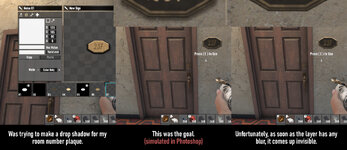
I'm using the "decal" variant. Under the plaque I want a blurry drop shadow to give the impression that the plaque is a 3d object.
The issue: The drop shadow displays beautifully and correctly in the sign menu, but as soon as I check it in the real world, the blurry edge is gone.
This video explains everything clearly:
- Reproduction Steps
- 1. Make a "decal" sign.
2. Make a layer and give it "softness" (on the first tab) to make it look blurry
3. Witness how it looks fine in the tool, but in-world it loses it's blur
- Link to Screenshot/Video
- https://www.youtube.com/watch?v=vlMXpuIcLu0