Windows No traders and no their's POI either

How do i fix No traders and no their's POI either? I had this game since old alphas tryed to unistall and installing again, tryed to clear up maps tryed to cancel all appdata files for 7d2d to fix it buy every time a load a map it doesn't create Trader's POI and there is always "no Trader".
How can i fix this problem to have a proper "first playthough" experience? Every map i need to go in debug mode to spawn static traders otherwise I can't play them. Even in navezgate I tryed to explore all the map to see if it was the quest itself that was bugged and the tracker was not pintpoint the location of it. If you need anything i can try to give you some photos, but i really want to do a proper playthough with all the traders on the map.
 
I haven't fired up Navezgane, in a long time, but a quick check of it's prefabs.xml file shows:

Code:
<decoration type="model" name="trader_bob" position="941,66,-1566" rotation="1" y_is_groundlevel="true"/>
<decoration type="model" name="trader_hugh" position="-957,76,1717" rotation="0" y_is_groundlevel="true"/>
<decoration type="model" name="trader_jen" position="190,74,-144" rotation="2" y_is_groundlevel="true"/>
<decoration type="model" name="trader_joel" position="-1586,66,-1215" rotation="0" y_is_groundlevel="true"/>
<decoration type="model" name="trader_rekt" position="428,61,644" rotation="2" y_is_groundlevel="true"/>

Other than Navezgane, are you using Vanilla RWG, Teragon, or something else to make maps?

Do you have any mods installed?
 
position="-2102,79,-942" rotation="1" y_is_groundlevel="true" />
<decoration type="model" name="trader_bob" position="941,66,-1566" rotation="1" y_is_groundlevel="true" />
<decoration type="model" name="trader_hugh" position="-957,76,1717" rotation="0" y_is_groundlevel="true" />
<decoration type="model" name="trader_jen" position="190,74,-144" rotation="2" y_is_groundlevel="true" />
<decoration type="model" name="trader_joel" position="-1586,66,-1215" rotation="0" y_is_groundlevel="true" />
<decoration type="model" name="trader_rekt"
straight up copied from my prefabs in navezgate.
Sorry if i couldn't answer before was at work, didn't know the answer was this fast
 
position="-2102,79,-942" rotation="1" y_is_groundlevel="true" />
<decoration type="model" name="trader_bob" position="941,66,-1566" rotation="1" y_is_groundlevel="true" />
<decoration type="model" name="trader_hugh" position="-957,76,1717" rotation="0" y_is_groundlevel="true" />
<decoration type="model" name="trader_jen" position="190,74,-144" rotation="2" y_is_groundlevel="true" />
<decoration type="model" name="trader_joel" position="-1586,66,-1215" rotation="0" y_is_groundlevel="true" />
<decoration type="model" name="trader_rekt"
straight up copied from my prefabs in navezgate.
Sorry if i couldn't answer before was at work, didn't know the answer was this fast

So you should have traders in Navezgane. The world refers to them. What is at those locations? Is it just a flat empty lot?

Do you have any mods installed?
 
It's empty no npc and no even the building(poi), tryed again still nothing
It's my only way spawn them with f6 in dm ? (i would even take my time and place them but there is no protected zones for them so i really don't know what to do
 
It's empty no npc and no even the building(poi), tryed again still nothing
It's my only way spawn them with f6 in dm ? (i would even take my time and place them but there is no protected zones for them so i really don't know what to do

So it is an empty lot. You shouldn't have to spawn in anything. There's some fundamental problem here.

Are there Mods installed?
 
Post your log file from a game session where you visit a trader that isn't there (before you add one). There is a good change that it will show the cause of the problem.
 
For the Mods no i have no mods i like to start vanilla maybe twek a bit with the settings in the login but thats it.
Second thing how do i post these logs? I mean i can create a navezgane map and go to the coordinates and even screenshot you what i see but how can i post you those "logs"? (i mean which file do i need to extract to show you)
 
For the Mods no i have no mods i like to start vanilla maybe twek a bit with the settings in the login but thats it.
Second thing how do i post these logs? I mean i can create a navezgane map and go to the coordinates and even screenshot you what i see but how can i post you those "logs"? (i mean which file do i need to extract to show you)
While in the game, press F1 to open the console. Click the Logs button at the top right. Look for the most recent log (after starting a game that has the missing traders and preferably going to the trader). Attach the file here if it lets you (depending on how long you've been a member on the forum, it may not allow that). If it doesn't allow it, go to pastebin.com and paste your log there and then put the link from that here. Make sure you don't set it to private on pastebin.com or no one will be able to see it. And don't set it to expire... at least not in less than a week.

It may also be better to walk/drive to the trader location rather than teleporting there. That *may* show something that teleporting doesn't. Probably not, but worth doing anyhow. Just use creative mode to spawn a motorcycle or whatever and gas and drive to the coordinates.
 
For the Mods no i have no mods i like to start vanilla maybe twek a bit with the settings in the login but thats it.
Second thing how do i post these logs? I mean i can create a navezgane map and go to the coordinates and even screenshot you what i see but how can i post you those "logs"? (i mean which file do i need to extract to show you)

No mods? This is going to be a real puzzle. So this is entirely Vanilla, you start a new game on the Navezgane map, and the trader POIs present as an empty lot. It suggests to me that the game cannot find the trader POIs.

On my computer, the game's Prefabs are stored here:

C:\Program Files (x86)\Steam\steamapps\common\7 Days To Die\Data\Prefabs\POIs

If the game is installed the same, then go to that folder and see if you can find these files:

trader_hugh.xml
trader_jen.xml
trader_joel.xml
trader_bob.xml
trader_rekt.xml

Or if you want to use the Windows search feature on that folder, you can search for: trader_*xml

As for Logs, we're hoping to see a couple of things, one of which would be an Exception. We're kind of hoping the game is throwing an error that will give us a clue as to what is happening, but since you're not reporting Red/Yellow text popping up in the console, I'm not sure we'll find anything. Logs can be found here on my computer:

C:\Users\zzton\AppData\Roaming\7DaysToDie\logs

... but your location will depend on your user ID.

As for a screenshot, I'd appreciate seeing one, but I'm not sure it would help diagnose what is happening. Is it JUST the traders that aren't being placed or do you have empty lots for all POIs?
 
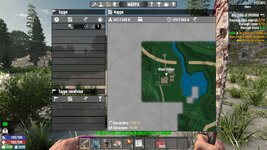
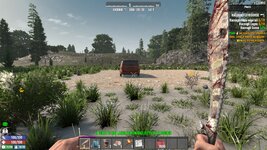
There we go navezgane new create spawned a motorcicle filled with gas, guide it to the rekt coordinated cleared zone. log + screens that there is no trader even the poi is not there.
For what i searched on internet normally on random generated map u should see merchant zones as a red squared i tryed to create 10k maps not even one red square in 15maps.
 

Attachments

For Zztong i posted the answer for Riamus but i think u can check the log and even the screenshots from my last post. For what you asked me i just checked except the 7d2d is in my "E" an not on the "C" disk because steam is all stored on E so steamapps is all saved on E.
PS In few minutes need to return to work so if u need file or tryed error need to wait 4-5 hours. I really appriciate your help i hope you can fix this problem that kept me form really playing this game :)
 
Last edited:
For Zztong i posted the answer for Riamus but i think u can check the log and even the screenshots from my last post

Thanks for the log file. It tells us what we needed to know about the POIs. Specifically, look at the lines like this...

Code:
2026-04-28T13:27:02 235.810 ERR Loading prefab "abandoned_house_01" failed: Block "woodBlock" (355) used in prefab is unknown.
2026-04-28T13:27:02 235.811 WRN Could not load prefab 'abandoned_house_01'. Skipping it

... and specific to the traders...

Code:
2026-04-28T13:27:09 242.123 ERR Loading prefab "trader_bob" failed: Block "woodBlock" (355) used in prefab is unknown.
2026-04-28T13:27:09 242.123 WRN Could not load prefab 'trader_bob'. Skipping it
2026-04-28T13:27:09 242.124 ERR Loading prefab "trader_hugh" failed: Block "woodBlock" (355) used in prefab is unknown.
2026-04-28T13:27:09 242.124 WRN Could not load prefab 'trader_hugh'. Skipping it
2026-04-28T13:27:09 242.126 ERR Loading prefab "trader_jen" failed: Block "concreteStairs50" (377) used in prefab is unknown.
2026-04-28T13:27:09 242.126 WRN Could not load prefab 'trader_jen'. Skipping it
2026-04-28T13:27:09 242.127 ERR Loading prefab "trader_joel" failed: Block "solidWoodFrameRamp" (353) used in prefab is unknown.
2026-04-28T13:27:09 242.128 WRN Could not load prefab 'trader_joel'. Skipping it
2026-04-28T13:27:09 242.129 ERR Loading prefab "trader_rekt" failed: Block "solidWoodFrameRamp" (354) used in prefab is unknown.
2026-04-28T13:27:09 242.129 WRN Could not load prefab 'trader_rekt'. Skipping it

... This is your game telling you it cannot find blocks that the prefabs need. It is affecting lots and lots of POIs, not just the traders. There is something wrong with the configuration of your game. The blocks that are missing are normal block shapes for things like wood and corrugated metal. Normally, I'd suspect a mod as messing things up, but...

0_TFP_Harmony is the only Mod that is loading, which means we don't have to fight through any of those complications.

Code:
2026-04-28T13:23:16 9.966 INF [MODS] Start loading from: 'E:/steam/steamapps/common/7 Days To Die/7DaysToDie_Data/../Mods'
2026-04-28T13:23:16 9.969 INF [MODS]   Trying to load from folder: '0_TFP_Harmony'

And we can see your user's directory paths:

Code:
2026-04-28T13:23:16 9.995 INF Loading permissions file at 'C:\Users\Mattia\AppData\Roaming/7DaysToDie\Saves/serveradmin.xml'

I'm wondering why it cannot find "solidWoodFrameRamp" and "woodBlock" as blocks.
 
Last edited:
Wow, that's a lot of errors. Are you sure you have no mods installed, or remains of previous mods you haven't deleted? The game is not finding a lot of blocks used in POIs, so it won't load them. Not just traders.
 
What should i do to fix it? i mean i unistalled 4 times in this couple of days, tryed to delete the mod files even tfp armony before reinstalling 7d2d.
Because i found a lot of post that say mod was the problem, but i never had a private session with normal generated traders.
I always tryed to do a private session to learn the game i tryed once to join a moded server but that's it i wanted to see the normal generation of the traders in the map.
How can i help you to help me fix this problem?
 
Wow, that's a lot of errors. Are you sure you have no mods installed, or remains of previous mods you haven't deleted? The game is not finding a lot of blocks used in POIs, so it won't load them. Not just traders.

I suppose one possibility is that game files were edited directly, not via XPath in a modlet.

What should i do to fix it? i mean i unistalled 4 times in this couple of days, tryed to delete the mod files even tfp armony before reinstalling 7d2d.

Harmony isn't a problem. That came with the game from TFP.

This is a puzzler. I mean I would think that uninstall and reinstall would solve it. Is there any chance you have the game installed multiple times and despite uninstall/reinstall, you keep running a messed up version stored somewhere else?
 
nothing changed by unistall and reinstall. there is only 1 version that i play and that's though steam because i bought the game from there
 
Last edited:
One suggestion. I've had in the past steam would install a game but it was not complete. Have you tried doing a steam 'verify files' after install? Maybe do it a couple times.

And I'm a bit confused. It looks like your screenshot shows that you have spawned into a new world, but your log indicates you have a motorcycle on the map. Did you just spawn those in for testing?
 
Fixed ■■■■ man it was tedious XD I did unistall with windows but that didn't solve the problem. What actually solve was deleting 7d2d folders after the unistall. i did check what was inside i was a folder with data and prefab from the alpha that i played in 2021 with logs too, i played in the alpha that had traders bugged no traders and no POI for some reasons it keep giving me that alpha as base even after reinstall. If i didn't delete those file manually probably it would never get fix
Post automatically merged:

One suggestion. I've had in the past steam would install a game but it was not complete. Have you tried doing a steam 'verify files' after install? Maybe do it a couple times.

And I'm a bit confused. It looks like your screenshot shows that you have spawned into a new world, but your log indicates you have a motorcycle on the map. Did you just spawn those in for testing?
i did 20times verify files. but the problem as i said it was an old version of that database that keep loading but dunno why
 
Back
Top