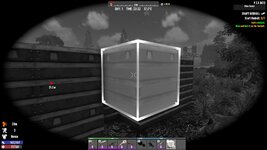
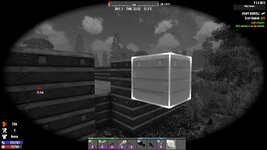
Invisible 'No build area'.

Version
2.5
Platform
Windows
Unable to place item due to some invisible build barrier.
 
Reproduction Steps
Ran game, created new build in creative mode on farm land, was able to build okay, however I got this invisible boundary where i was unable to place item, no red box or anything.

Sorry about the random youtube video, I didnt record video for this.
Link to Logs
https://justpaste.it/k3wr9
Link to Screenshot/Video
https://www.youtube.com/watch?v=Qc5NM9K27tM&t=195s
Attachments

  • 20251231090842_1.jpg
    20251231090842_1.jpg
    217.3 KB · Views: 12
  • 20251231090847_1.jpg
    20251231090847_1.jpg
    210.8 KB · Views: 12
Usually a POI has 2 blocks where you can't build anything because that space is reserved for the flag where you start a quest.
No. I have just started the game, Ive not triggered any POI.

You can build either side of this block np, just one single block, I have been advised on facebook this issue is specific to building on Farmland.

I even used the DM mode DEV digger tool to remove everything and then filled it back in with land filll and the issue persists.
 
No. I have just started the game, Ive not triggered any POI.

The blocks I mentioned are always there if there is any POI located there, you don't need to trigger it.

You can build either side of this block np, just one single block, I have been advised on facebook this issue is specific to building on Farmland.

If farmland is placed there as a POI then this block would be there. POI doesn't mean there must be a building on it. POI is just a pregenerated collection of blocks that can be placed somewhere like stamps can be placed on an envelope.
But it could be a bug, I just wanted to provide one likely explanation or thing to check for. We'll see, eventually a tester from TFP will look at your issue and comment on it.

I even used the DM mode DEV digger tool to remove everything and then filled it back in with land filll and the issue persists.
 
From the pics it doesn't show they are in a POI as it just says Pine Forest instead of the POI name, unless they are just one block outside the bounds of a POI.

Is it just that one space you can't place a block, or is it the one below it as well?
 
I'm guessing it may be the buried supplies tutorial quest not active in your quest log? If not, we'd need to know where it was. If you could, remove your mods folder and make a new game save on that same world, go back to it and then see if the same collider exists there. But, we definitely would need to know where this is (could be a poi that isn't a full poi so it's not showing you the name of it, lots of those are used for world gen)
 
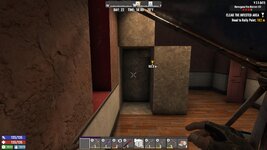
I'm having a similar problem. I'm in Navezgane Fire District #3 in the bedroom and there are 2 spaces that won't let me place anything. Is there a way to use edit mode or a dev tool to work around this? In the picture it is one space on top of the other in between the building cubes. It's too deep into the poi to be the quest marker. I've removed surrounding blocks and recalculated stability, but didn't fix it.
 

Attachments

  • V2.5_2026-01-09_12-12-33.jpg
    V2.5_2026-01-09_12-12-33.jpg
    526.7 KB · Views: 8
Back
Top