Windows FPS drops to single digits when moving the mouse

Version
V2.5 (b32)
Platform
Windows
As per the title. If I move around with WASD without moving the mouse FPS is fine. As soon as I move the mouse, FPS drops to unplayable levels, the game is a slide show.
Things I've tried:
  • verify integrity of game files
  • roll back to 2.4 version
  • reinstall game entirely
  • update GPU driver
  • many variations of in-game graphics and video settings

Video attached is from a previous user with the exact same issue.

Please, any assistance would be appreciated. I've asked for help days ago and been ignored.
 
Reproduction Steps
Run the game and move the mouse
Link to Logs
https://pastebin.com/0igzMJzL
Link to Screenshot/Video
https://www.youtube.com/watch?v=0LVZWavp8pk
Hello! Thanks for the reply.

Hopefully this works, I uploaded a new paste from a game session where i logged in, walked forward without moving the mouse at around 120fps, then moved the mouse for a bit and dropped fps to around 6.


Vsync was already set off so I just left that as is.

Thanks again for helping!
 
I've been running into a similar issue on a dedicated server. Several friends and I that all play together have noticed this happen when a ton of zombies are on screen - so far it's been happening in large POIs, like Vanity Tower, Higashi Pharmaceutical, etc, and during Horde Nights.
 
Edit: turns out when I open my inventory now, the mouse sensitivity is way too high, so this is not an ideal solution. Any further help finding an alternate fix is still appreciated.

I actually just found a solution; i use a razer deathadder mouse so i downloaded the software for it and set the "wired polling rate" to 125Hz instead of the 1000Hz it was set to by default.

Hopefully if anyone else has the same issue this might help!
 
mobo: ASUSTek TUF gaming X570-plus
I suspect something in Armoury crate is causing this.
As a test can you uninstall it, and uninstall all the extra Asus
apps that it installs, and then try again. You can always
reinstall the bloatware if you want.

You have to disable Armoury Crate in the bios, or it
will reinstall itself. Instructions to do that are here.
 
OK i followed the instructions to disable armoury crate in the BIOS, then I uninstalled it on next reboot. I'm hoping it's not a critical piece of software in any way but a quick google seems to suggest its mostly bloatware?

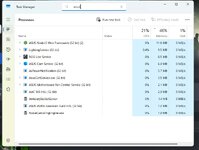
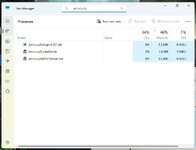
With regards to uninstalling other ASUS apps, I was less confident to just go ahead and remove other items so I've attached screenshots of asus/armoury items I can find, should I remove any of these specifically?

I ran another session of the game and the issue persists: https://pastebin.com/ebd67PTv

As always, thanks for helping :)


1.jpg2.jpg3.jpg
 
OK i followed the instructions to disable armoury crate in the BIOS, then I uninstalled it on next reboot. I'm hoping it's not a critical piece of software in any way but a quick google seems to suggest its mostly bloatware?

With regards to uninstalling other ASUS apps, I was less confident to just go ahead and remove other items so I've attached screenshots of asus/armoury items I can find, should I remove any of these specifically?

I ran another session of the game and the issue persists: https://pastebin.com/ebd67PTv

As always, thanks for helping :)
Did you use the "Armoury Crate Uninstall Tool" to remove Armoury Crate?
Also, do you have this problem in any other games?
 
Back
Top