iiEco-Ryan3166
Refugee
Im at my wits end with this tbh. Ive done everything I can on my end to try and fix it, which isnt much Im able to do. Making a post on this forum is my last hope of figuring out if I can either fix it, wait on a patch, or just stop playing because its genuinely unplayable at this point.
TL;DR - Extreme lag, ping and rubberbanding for no reason. Ive checked my internet using internet tests online, it's perfectly fine. No one else on the server is having lag problems to the degree I am. I joined someone else's heavily modded/POI heavy server, the issue remains. I made my own server and the issue remains, so its not my friends' server. Especially when no one else is having the same problem. I was able to play perfectly fine the first 2 days of gameplay, now its unplayable. No amount of screwing around with in-game graphics settings helps, even at all low. My PC can run it according to several sites.
- As a second issue, while riding my bicycle, I either see vehicles/shopping carts/stuff around buildings unloading and reloading within view which means Im likely to run into them.
In-depth info:
This is on my friends' normal server where we all live in the same state. The first time I played the game early this week I had lag during horde night as usual, but was perfectly fine until yesterday for no reason.
For this, Ive tried changing all my settings, render distance stuff, nothing fixes it. Its nearly impossible to clear buildings like I was able to before due to this lag. Not to mention the extreme rubberbanding when using my bicycle. Ive managed to spot my ping at 280 once, as its hard to load the Players tab to see my ping while the spike is happening at the time. Could be higher, definitely feels like it at times.
Ive tried steps for every single post on forums, reddit, YouTube videos Ive found. I have no idea how to fix this especially considering no one else is being affectedI made my own world with zero mods and Im still lagging, rubberbanding n ■■■■, so its not my buddy or the server.Im at a loss, idk what to do to fix this now. The game is literally unplayable when Im now getting hit because my shots are killing enemies too late for the zombies to hit me, let alone simply looting ■■■■ because I cant even look around without lag.
Its lagging and rubberbanding when walking, looking around, looting crates is delayed, killing enemies is delayed, especially using my bicycle for transport with extreme rubberbanding. Its affecting game progress too, because I cant craft the motorcycle Im able to craft now because if the bicycle is unusable, the motorcycle going twice as fast definitely will be.I really want to play this game but Im not gonna be able to much longer if I cant fix this.
-
The part about prefabs and textures like chimneys, pieces of roofing, other buildings and ruined cars in the road looking like theyre despawning and respawning or just spawning out of nowhere for me to crash into has been happening the whole time Ive played the last 5 days. Thats the best I can explain that, and I havent figured out how to fix it. Makes me second guess even making a vehicle if I cant drive anywhere without running into cars that randomly spawn in the road.
Please. If anyone can help me figure out if theres some way I can fix this on my end or if its a known issue and a patch is coming, that'd be great. Otherwise I cant play this game anymore.
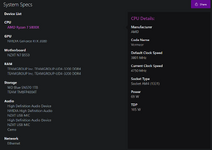
System specs attached
TL;DR - Extreme lag, ping and rubberbanding for no reason. Ive checked my internet using internet tests online, it's perfectly fine. No one else on the server is having lag problems to the degree I am. I joined someone else's heavily modded/POI heavy server, the issue remains. I made my own server and the issue remains, so its not my friends' server. Especially when no one else is having the same problem. I was able to play perfectly fine the first 2 days of gameplay, now its unplayable. No amount of screwing around with in-game graphics settings helps, even at all low. My PC can run it according to several sites.
- As a second issue, while riding my bicycle, I either see vehicles/shopping carts/stuff around buildings unloading and reloading within view which means Im likely to run into them.
In-depth info:
This is on my friends' normal server where we all live in the same state. The first time I played the game early this week I had lag during horde night as usual, but was perfectly fine until yesterday for no reason.
For this, Ive tried changing all my settings, render distance stuff, nothing fixes it. Its nearly impossible to clear buildings like I was able to before due to this lag. Not to mention the extreme rubberbanding when using my bicycle. Ive managed to spot my ping at 280 once, as its hard to load the Players tab to see my ping while the spike is happening at the time. Could be higher, definitely feels like it at times.
Ive tried steps for every single post on forums, reddit, YouTube videos Ive found. I have no idea how to fix this especially considering no one else is being affectedI made my own world with zero mods and Im still lagging, rubberbanding n ■■■■, so its not my buddy or the server.Im at a loss, idk what to do to fix this now. The game is literally unplayable when Im now getting hit because my shots are killing enemies too late for the zombies to hit me, let alone simply looting ■■■■ because I cant even look around without lag.
Its lagging and rubberbanding when walking, looking around, looting crates is delayed, killing enemies is delayed, especially using my bicycle for transport with extreme rubberbanding. Its affecting game progress too, because I cant craft the motorcycle Im able to craft now because if the bicycle is unusable, the motorcycle going twice as fast definitely will be.I really want to play this game but Im not gonna be able to much longer if I cant fix this.
-
The part about prefabs and textures like chimneys, pieces of roofing, other buildings and ruined cars in the road looking like theyre despawning and respawning or just spawning out of nowhere for me to crash into has been happening the whole time Ive played the last 5 days. Thats the best I can explain that, and I havent figured out how to fix it. Makes me second guess even making a vehicle if I cant drive anywhere without running into cars that randomly spawn in the road.
Please. If anyone can help me figure out if theres some way I can fix this on my end or if its a known issue and a patch is coming, that'd be great. Otherwise I cant play this game anymore.
System specs attached