Dedicated Server Map Issue

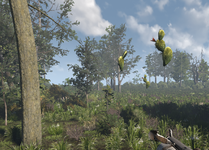
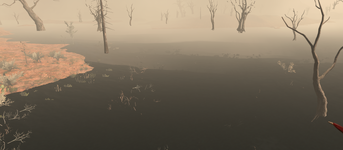
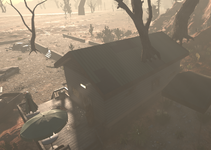
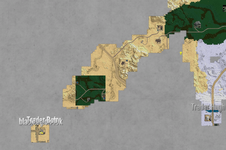
I believe I accidentally created two maps with the same seed and RWG world name, but with different % of land masses. These two maps appear to be mashed together in a lot of spots. Wrong biome trees and land is partially overlaid with plant life and height map road issues. I see a lot of trees floating in the air and in God mode can see objects/trees under the map, but bleeding into the top side.

I still have both maps, I believe, but would like to know if I can fix this issue by manipulating the regions and such, but still maintain existing Player structures (both POI take-overs and block built) and character/progression?

I think I saw an article in 2023 that had a similar discussion, but no outcome, back then. I believe they mentioned something about the RWG randomizer caching maps during the build process and not clearing until shutdown/restart.

I've attached some pictures of my current map. I have 4 other players on this map, and we've gone as far as 138 days.

Any assistance/fix possible?
 

Attachments

  • Screenshot 2026-07-09 010830.png
    Screenshot 2026-07-09 010830.png
    837.3 KB · Views: 2
  • Screenshot 2026-07-07 120135.png
    Screenshot 2026-07-07 120135.png
    1.6 MB · Views: 2
  • Screenshot 2026-07-07 111940.png
    Screenshot 2026-07-07 111940.png
    877.8 KB · Views: 2
  • Screenshot 2026-07-07 111736.png
    Screenshot 2026-07-07 111736.png
    1.1 MB · Views: 2
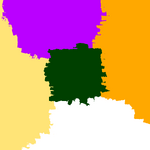
I listed what is mostly showing as the correct map and the "overlaid" map for reference. The correct one was a server generated map and the other is a single-player generated, because that's originally how I thought they needed to be created for the dedicated server.
 

Attachments

  • biomes_correct.png
    biomes_correct.png
    33.8 KB · Views: 0
  • biomes_incorrect_overlaid.png
    biomes_incorrect_overlaid.png
    33.9 KB · Views: 0
I listed what is mostly showing as the correct map and the "overlaid" map for reference. The correct one was a server generated map and the other is a single-player generated, because that's originally how I thought they needed to be created for the dedicated server.
Changing biomes in a current save definitely creates problems, though most of those problems are just visual and won't really break the game. You can try using the region reset command ("rr help" for information), but be aware that any regions that are reset will go back to the original state when the game was first started. Anything not protected by either land claim, bedroll, or vehicle will be reset, including bases, mines, etc. It's definitely something to do after making a backup of the save in case of problems. But even with that, it isn't guaranteed to completely fix the biomes as I haven't had perfect success with it during tests. Still, that's probably your best option beyond starting a new game.

And if more than just biomes were messed up, such as a new heightmap, you may run into stuff that even region resets won't properly fix. Unfortunately, there's not really much else to do beyond the region reset command or starting a new game. In the future, just be careful to make sure the world name isn't already being used. And keep a backup, not just of your saves, but of your worlds. Then, if you realize it happened, you can go back to your backup of both the world and the save right away and not lose much.
 
Back
Top