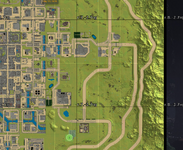
Chunks not loading

thatmancam

Refugee
Version
2.6
Platform
Windows
Ever since I installed the new update there are parts of the world that don't generate and whenever I'm driving through some areas I ended up slowly falling. Most of the time I get lucky and can back up and save my vehicle but I lost a motorbike and a motorcycle due to this bug. It is making my world unplayable because all my tier 5 challenges are 1 km away and around those areas most of the chunks dont load.
 
Reproduction Steps
Cant explain
Link to Logs
https://pastebin.com/CvkX32qV
Link to Screenshot/Video
https://youtu.be/y6-z14SFvG4
Ever since I installed the new update there are parts of the world that don't generate and whenever I'm driving through some areas I ended up slowly falling. Most of the time I get lucky and can back up and save my vehicle but I lost a motorbike and a motorcycle due to this bug. It is making my world unplayable because all my tier 5 challenges are 1 km away and around those areas most of the chunks dont load.
Hey there thatmancam,

Looking at your attached logs I noticed that you got some mods installed.
Could you confirm that your issue persists when you run a vanilla session?

If the issue is being caused by modded game files you'd have to contact the mod creator from the mod that causes this issue.

Best regards,
Revi
 
HAve you found anything wrong?
Had a deeper look into it and was not able to reproduce it, could you try to validate your steam files and see if that changes anything?

And got two more questions.
The area that does not load correct, is it close to any trader?
From your log it looks like you teleported to the location, was it broken before this?
 
okay I will try when I get home later. When it first happened it was at a quest I died in the room and when I drove by it later on the chunk wouldn’t load. And then while I was heading to another quest I found multiple chunks not loading in. And the location i teleported too was 0,0,0 because when i load back into the world near the unload chunks i get stuck on the building environment screen so i have to tp away to get into the world. I never used creative or debug menu in the world until i got stuck in the unload chunks
 
okay I will try when I get home later. When it first happened it was at a quest I died in the room and when I drove by it later on the chunk wouldn’t load. And then while I was heading to another quest I found multiple chunks not loading in. And the location i teleported too was 0,0,0 because when i load back into the world near the unload chunks i get stuck on the building environment screen so i have to tp away to get into the world. I never used creative or debug menu in the world until i got stuck in the unload chunks
What you describe sounds like a region error that is normally caused by a crash, though not always. You might want to check the region files in your save game to see if any are 0 bytes. If so, you can remove any that are 0 bytes and see if it helps. You can also use the region reset command to try and fix region files. Open console (F1) and type "rr all" to reset all or use "rr help" to get help on other ways you can use the command. However, be aware that resetting regions will remove all changes to the region(s) that are reset except where a land claim or bedroll is. That includes bases, mines, etc. Of course, if you have a 0 byte region, you won't be able to restore that anyhow unless you have a backup of it.
 
What you describe sounds like a region error that is normally caused by a crash, though not always. You might want to check the region files in your save game to see if any are 0 bytes. If so, you can remove any that are 0 bytes and see if it helps. You can also use the region reset command to try and fix region files. Open console (F1) and type "rr all" to reset all or use "rr help" to get help on other ways you can use the command. However, be aware that resetting regions will remove all changes to the region(s) that are reset except where a land claim or bedroll is. That includes bases, mines, etc. Of course, if you have a 0 byte region, you won't be able to restore that anyhow unless you have a backup of it.
I tried this and it didnt work either at this point seems like I cant save the world at this point
 
I tried this and it didnt work either at this point seems like I cant save the world at this point
Seems like it might be a similar issue as described in this post.
You could try to follow the instructions that Dollie shared there, this would be a known issue with a future fix. But it tends to happen close to traders rather than random bits of the world..
Please let me know if that might fix your world.

And I'd highly recommend to always backup your world before approaching any fixes that include reset/deletion of world files.
 
I also encountered the same problem; a certain area was directly damaged.
Exception: Incorrect region file header! /home/container/.local/share/7DaysToDie/Saves/SM8K/MyGame/Region/r.7.-3.7rg
It broke for no apparent reason.
 
BUG.png
Post automatically merged:

After deleting r.7. -3.7rg, I called offline players. As shown in the above figure, there are no players in this map block, and no players have built it. But he just inexplicably broke down
 
https://pastebin.com/yqrvkNB1 this is a new logs when i first opened the world I got a ton of errror codes
Delete r. 0. -3.7rg from the archive location, and then everything will be fine, although all constructions within the r. 0. -3.7rg map will be completely reset. Your save location is C: \ Users \ Cam \ AppData \ Roaming \ 7DaysToDie \ Saves \ Kubixe Count \ My Game \ Region/
Post automatically merged:

You could try to follow the instructions that Dollie shared there, this would be a known issue with a future fix. But it tends to happen close to traders rather than random bits of the world..
Yes, near the merchant, I saw a similar fix in another post but it hasn't been updated to B14
 
Back
Top