Ostentatio
Scavenger
- Version
- 2.6b14 but also happened in 2.5
- Platform
- Windows
This has already been reported before ( https://community.thefunpimps.com/threads/black-smoke-and-clouds.46301/ ), but I'm re-reporting with more information on my end in case it helps narrow it down before 3.0. Would've tacked onto that thread, but slightly different circumstances for the same visual bug and their issue seemed to have been resolved.
Hardware: i7-7700KF, RTX 3070 (driver 32.0.15.8115 in Device Manager)
My game is modded, however I only have one mod I could tell might have affected particles/visual rendering (Torch) and removing it did not change anything, plus the previous report was mostly unmodded except for one he found in %AppData, and I've never used that same mod.
I think it's temperature or temperature-buff related, possibly the 'Cold' condition, maybe time-of-day is also involved. My reasons for thinking so:
- I've had it happen in the Pine Forest sometimes but it's every night in the Snow biome. I never thought to watch temperatures before this latest instance
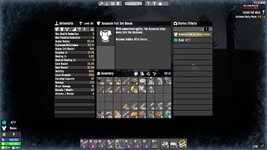
- Only happens at night when outdoors/unsheltered (screenshot was from when it began at 00:20, ambient temperatures dropped below 15F)
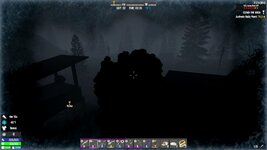
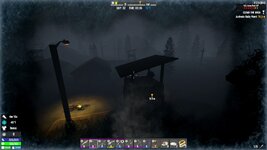
- I sat still outside for the rest of that night, and it kept happening until 03:35 as shown in attached pictures. No evident temperature change when it stopped, but maybe a weather/lighting shift happened? I couldn't tell specifically in the Steam Recording replay.
- It's consistent, every night around the same time/temperature in Snow. I don't believe it's ever happened after dawn, so I think some combination of night+Cold
It also affects muzzle flashes on all firearms*, and the previous report thread had it affect distant storm particles (which I've never noticed on my end). I've also changed just about every video setting I could touch in-game, with no changes to the black particles. It may not be temperature/'Cold' related, but it definitely only happens at night and typically after 00:00.
Related: This mod claimed to have a fix, but I didn't use it due to comments indicating it was spotty and the general tone of the description, though I did look at its file and it was doing something to the 'Cold' status in buffs.xml.
Unrelated: It'd be nice to be able to upload .mp4s at least in Bug Reports, even with a 10-15MB size limit; I don't have/use a YouTube account so I there's not much options for uploading a video without going to a website that deletes it after a short timeframe
Hardware: i7-7700KF, RTX 3070 (driver 32.0.15.8115 in Device Manager)
My game is modded, however I only have one mod I could tell might have affected particles/visual rendering (Torch) and removing it did not change anything, plus the previous report was mostly unmodded except for one he found in %AppData, and I've never used that same mod.
I think it's temperature or temperature-buff related, possibly the 'Cold' condition, maybe time-of-day is also involved. My reasons for thinking so:
- I've had it happen in the Pine Forest sometimes but it's every night in the Snow biome. I never thought to watch temperatures before this latest instance
- Only happens at night when outdoors/unsheltered (screenshot was from when it began at 00:20, ambient temperatures dropped below 15F)
- I sat still outside for the rest of that night, and it kept happening until 03:35 as shown in attached pictures. No evident temperature change when it stopped, but maybe a weather/lighting shift happened? I couldn't tell specifically in the Steam Recording replay.
- It's consistent, every night around the same time/temperature in Snow. I don't believe it's ever happened after dawn, so I think some combination of night+Cold
It also affects muzzle flashes on all firearms*, and the previous report thread had it affect distant storm particles (which I've never noticed on my end). I've also changed just about every video setting I could touch in-game, with no changes to the black particles. It may not be temperature/'Cold' related, but it definitely only happens at night and typically after 00:00.
Related: This mod claimed to have a fix, but I didn't use it due to comments indicating it was spotty and the general tone of the description, though I did look at its file and it was doing something to the 'Cold' status in buffs.xml.
Unrelated: It'd be nice to be able to upload .mp4s at least in Bug Reports, even with a 10-15MB size limit; I don't have/use a YouTube account so I there's not much options for uploading a video without going to a website that deletes it after a short timeframe
- Reproduction Steps
- Freezing my butt off at night (e'rry night in Snow), even on blood moons, not a great time
Seems always at night; affects character breath and muzzle flash (with and without silencer mod)
Cold condition, maybe? Or possibly night + weather combination, like fog or lighting as factors?
Consistently after 00:00, how long it lasts after that may vary environmental conditions
More specifics in main post
- Link to Logs
- https://pastebin.com/3xPZvR0G
- Link to Screenshot/Video
- https://drive.google.com/file/d/1blDDtFNyN1wFDQ85cc9hKZXqLt-JbKOP/view