
- Version
- 2.6(b10)
- Platform
- Windows

- Reproduction Steps
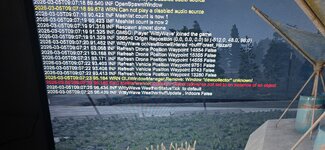
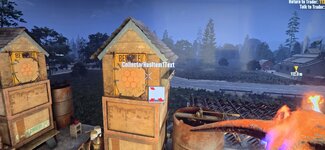
- i have bought a rented server by Nitrado. It is an experimental build server. the current version is 2.6(b10). Since the update i have encountered multiple bugs. First on loading screen of connecting to server. the cmd in game pops up and cant close it until the game shows spawn. Once spawned. Automatically you are greeted with a visual glitch (red x in center of screen) that are visible in the images provided. Not a big problem as i can just reload the UI but a problem non the less. Also in the images provided you will notice collectoremptytext / collectorhasitem1text being displayed. If u try to access the items inventory you will get the cmd pop up giving multiple different errors every time you first attempt to entre. Once you do so, the game will not allow you to access the apiary, dew collector and the fire pit. If you restart the game, the same thing will happen just the txt might be different in the cmd. Thing i have tried to do to fix the issue was; 1. Restart server and update it. 2. Returned all setting to default. 3. Verified file with in steam. 4. Uninstalled game and reinstalled it. 5. Tried top use debug menu (not at that skill level). 6. Had one of my friends join its with the same result. 7. Left server offline for 5 days or so.
PS. This server was used with 5 other streamers throughout the v2.5 with no issues at all. I will keep checking in on this matter as of right now the game cannot be played without any way to get water or food prepared. Thank you for your time.
- Link to Logs
- https://pastebin.com/MQNRLWcM
- Link to Screenshot/Video
- https://drive.google.com/drive/folders/14XjDbaisqn97bxMmeXQXA8KEBsjhguBD?usp=sharing
