3.0 Thoughts

Are you talking about the images that show above the tips when the game is loading?
One of those images showcases the old, blue lumberjack...while the rest of them might have a current model up front, but old models in the background.
No. Before the menu appears.
 
Are you talking about the images that show above the tips when the game is loading?
One of those images showcases the old, blue lumberjack...while the rest of them might have a current model up front, but old models in the background.
The Advert page.
Post automatically merged:

And unless I haven't noticed since 3.0, "show entity damage" shows player damage numbers too. And also, "Show Damage Numbers" is a more intuitive name to boot.

This is an excellent example of easy-to-make UX mistakes. Having a tab named "Entities" is total developer brain. Of course I've spent enough time modding the game that I failed to catch it myself, but the average user will have no idea WTF that means. And the player is an Entity so...
 
The Advert page.
Post automatically merged:


This is an excellent example of easy-to-make UX mistakes. Having a tab named "Entities" is total developer brain. Of course I've spent enough time modding the game that I failed to catch it myself, but the average user will have no idea WTF that means. And the player is an Entity so...
No. This screen:
1782393068318.png
 
I have news/etc. disabled, so I see them and then the menu, one right after the other, which is jarring because they are different styles.
 
I have news/etc. disabled, so I see them and then the menu, one right after the other, which is jarring because they are different styles.
I see. I just double checked. I see the following

1. Fun Pimps logo
2. Static tableau
3. News
4. Animated tableau menu

At no point do I see the image you shared. It's not part of the game for me anymore.

On your previous question, about centering. I'm not sure what you mean by centering because it looks pretty centered to me:

1782438512508.png
 
I see. I just double checked. I see the following

1. Fun Pimps logo
2. Static tableau
3. News
4. Animated tableau menu

At no point do I see the image you shared. It's not part of the game for me anymore.

On your previous question, about centering. I'm not sure what you mean by centering because it looks pretty centered to me:

View attachment 39685
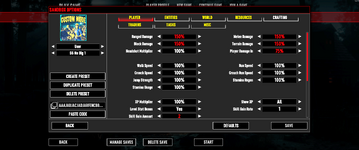
If you look back to the original post, centering was referring to the settings, not game options. Game options don't have a large blank space on the right side. It's confusing because they are all options, but some are for the save (game options or sandbox options) and some are for the overall game settings (available from the main menu).

It's strange if you don't see the 7D2D splash screen before the menu. I've always seen that and still do. Maybe it only shows if you're not showing the news, but that would be a strange way of doing things. I'm using the launch options to skip the intro and news screens. Maybe if you were using those you would see it. Or maybe it's something broken in the update to 3.0 for me.
 
If you look back to the original post, centering was referring to the settings, not game options. Game options don't have a large blank space on the right side.

Oh, so I've been completely misunderstanding you the entire time. Pretty typical of me. The blank space on the right in the game settings, if I'm understanding you finally, is where the hover text is. That whole thing is extremely awkward and makes me want to get out of it asap.
 
Oh, so I've been completely misunderstanding you the entire time. Pretty typical of me. The blank space on the right in the game settings, if I'm understanding you finally, is where the hover text is. That whole thing is extremely awkward and makes me want to get out of it asap.
No problem. As I said, it's confusing to know which one is being talked about. I normally try to say game options for what are now called sandbox options and settings for the settings you get at the main menu. But not everyone follows that and so it's never really all that clear. Not to mention that the main menu calls the settings "options" to further confuse people.

I do see the hover text there now that I moused over the stuff. I don't think I tried that originally and didn't see it. I suppose that makes some sense, but why use 2 different ways of displaying mouseover text?

1782443184830.png

vs.
1782443207409.png

You'd think that they'd pick one method and use it throughout instead of different methods in different locations. It would also look better, imo.

And just since I did a screenshot of it... I don't think I've ever seen a game that required a *RESTART* of the game to change the language. That is kind of dumb, imo.
 
And just since I did a screenshot of it... I don't think I've ever seen a game that required a *RESTART* of the game to change the language. That is kind of dumb, imo.
Now you're just complaining for the sake of complaining. Plenty of programs/apps/games works that way as it depends on the implementation. If you were a TFP employee working on localization I would agree with you, but as an end user - no.
 
And just since I did a screenshot of it... I don't think I've ever seen a game that required a *RESTART* of the game to change the language. That is kind of dumb, imo.

I have seen this quite often. Not the majority of games but it´s not uncommon. I always switch my games to english, that´s how i know. And it have been games from small single developers up to AAA games. Sometimes even needing a download.
 
Back
Top