Windows Random crash only with other players

Version
2.6 b14
Platform
Windows
I've been having an issue this past week that I cannot seem to nail down. I play with two friends most evenings. When playing alone I NEVER crash, even though I am playing in online mode so they can join if they so desire. The last three crashes occurred when one of my friends attempted to loot something. She presses E to loot and my game crashes (I am the host). My game freezes and just disappears. No crashpad or anything. We have tried this both with and without the three modlets we normally use. One simply adds longer days (up to six hours/360min per day), one alters the dew colectors to produce less heat and make water around six hours instead of ten, and the third is one I am working on but not using in this save that adds a new MP5 with proper fire rate and all. All three are modlets only, XML code. No DLLs or extra models and icons or anything.

I attached my latest log. My friend was on her way back from Rekt, I was in the clothing store in the northwest area south of the snow and just a hair north of the lake. She went to loot something and my game crashed. I was standing still at the time. We both verified our game files and both passed. We're using Windows Defender and common-sense for an anti-virus, so no bloaty McAfee or Norton. Windows Firewall is active but 7 Days has been allowed through. We both run as normal users and not as administrators. We have full NTFS permissions to the game directories via the Authenticated Users group. Her connection is a bit lacking, but I am on gigabit coax.
 
Reproduction Steps
Unknown. Play with a friend and occasionally it crashes when that friend loots something. Can be hours or minutes into a sesssion.
Link to Logs
https://pastebin.com/YDj3NpY7
Link to Screenshot/Video
https://www.youtube.com/
I have an update. The bug only occurs when playing with others. I played for two hours tonight to see if it would crash and it does not. I was in hosting mode/friends only. Same as a normal game, but one friend was busy and the one with the slow connection was playing something else with another friend. I believe the issue may actually be improper handling of an incomplete packet due to my friend's bad connection.

To test this theory, the other friend, on gig fiber, is going to play with me for at least one to two hours. I will then play with only the friend on the bad connection for one or two hours. If it crashes with just her, then it is likely due to packet-loss or something. Still, I would think PL could be handled without taking down a server. Maybe she has malformed packets or something.
 
Hi The_Great_Sephiroth,

Thank you for the detailed write-up. It helps, but based on the description alone, it's still hard to determine what is actually causing the crash. I am going to move your ticket to Needs More Info and await your additional information.

If you don't mind sharing, could you also share your system specs?
  • CPU
  • GPU
  • RAM
  • Storage type (SSD/HDD)
  • Windows version
Best,
Dollie
 
i9-11900k
RTX 3080 Ti
64GB DDR4
Windows 10 Enterprise (Yes, legal, not pirated)
4 x 2TB NVME PCIE 4.0 in RAID0 (7 Days lives here)
4 x 1TB WD Black Single-Platter HDD in RAID0
4 x 2Tb WD Blue SATA SSD in RAID10 (Windows 10 lives here)
1 x Pioneer BDXL Blu-ray Burner (SATA)
 
Okay, we started to play tonight and my ISP had an issue. I did not lose connection to them, but they lost connection to everything else. The game instantly crashed and claimed it couldn't allocate ~2MiB of RAM... on my 64GB system. Claimed I was out of RAM. I attached the log to this response.
 

Attachments

Hello,

Thank you for the additional information and for providing the output log for us to review.

From what I can see, the crash appears to be related to your system running out of video memory while handling textures. This is totally different than running out of system RAM. This type of issue can occur when the game is trying to load or stream a large number of high-res assets at once.

To help reduce the chance of this happening again, you may want to try lowering some of your graphic settings and see if the issue persists. The settings that tend to put the most stress on VRAM are texture quality, view distance, object/tree quality, shadows, and reflections. Reducing these may help lower VRAM usage.

Additionally, if you are hosting the game, this can also increase overall system load since it requires your system to handle both the game client and server processes at the same time. Since you are using mods, you may want to try disabling them, as some can increase memory usage due to additional or higher resolution assets.

Please let us know if you continue to experience this after making these adjustments.

Best,
Dollie
 
Unless something major changed in 2.6, 7 Days has NEVER managed to eat more than about eight gigs of VRAM. I am going to monitor it, but I've been playing 7 Days for years (even on a GTX 550 Ti back in the day) and never had this issue. I played in 1440p on a 2080 Ti and now this 3080 Ti and only with 2.6 has it crashed. Same settings across all cards (everything maxed, 2560x1440@144).

I'll monitor the VRAM usage, but if the game eats more than ASA or Cyberpunk (they don't max my card out) would that not indicate either a leak or something else?
 
Okay, got another crash. I played solo for 1.5 hours earlier and VRAM peaked just under 7GiB. I played with my friend for an hour and the game just disappeared. No crash log or anything. It just went poof. Ram usage was under 8GiB. Mind you, a 3080 Ti is a 12GiB card and I have 31.9GiB of shared RAM. 44GiB total. I attached the game log and a dump of my GPU info that ran while I was playing.

The CSV was dumped using nvidia-smi and logged the timestamp, GPU utilization, temp, and used VRAM once every five seconds. I wrote a small batch file I can click to run this whenever I want to.
Code:
@ECHO OFF
SET isodate=%date:~10,4%%date:~4,2%%date:~7,2%_%time:~0,2%%time:~3,2%%time:~6,2%
SET filename=GPU-Stats-%isodate%.csv

ECHO nVidia GPU Stats Logger
ECHO By: <nah, censoring>
ECHO (c) 2026

ECHO Logging stats once every five seconds to: %filename%
ECHO Press CTRL+C to terminate and end logging
nvidia-smi --query-gpu=timestamp,utilization.gpu,temperature.gpu,memory.used --format=csv -l 5 > %filename%
As the CSV shows, I am under 7.5GiB used, the game just disappears, and it drops to normal desktop amounts of use, ~600MiB. The uploader refused to let me upload a CSV, so I zipped it. it is 25k unzipped.
 

Attachments

Hello.
Im not affiliated with the Pimps but I wanted to see if I could offer some help here;
Few questions:
1. What version of windows are you running?
2. Is windows update BOTH current AND successful?
3. GPU update, BIOS firmware?

There is a large discrepency between games reserved RAM and GPU reserved VRAM.
Delta of 1.1GB and change.
Your in-game logs show no stack trace error leading me to think this isnt a software based issue but rather OS/Machine.
Im unsure what would cause such a large delta short of a memory leak, corruption, bad/corrupt OS files or GPU files.

I would suggest the following in order of ease to make sure its not windows...
1. Disable your windows paging file and delete it. Restart your PC and check to see if that RAM delta fixes. (Perhaps old windows update files interfering with new ones via Paging.)
2. SFC /scannow. (System File corruption check)
3. Check to make sure all firmware/bios and GPU drivers are current.
4. Reinstall GPU driver.

I suspect old/corrupted data is being stored/saved on your GPU RAM.
(Please note; this process assumes you have already verified file integrity for 7d2d and also performed a manual deletion of game files and verifying again.)
BIOS for Mobos have updated two or three times in the last 2-3 months as well.
Windows is actively changing the OS code in their updates and you might need to revert if the above doesnt help.
Your game log shows no errors except the one you are describing and this is very uncommon because 7d2d has a very robust stack trace.
I also do not see anything in the logs that would lead me to suspect a memory leak so, id start by verifying windows OS and BIOS updates.
One moment everything is fine then all of a sudden, GPU just stops. Its not even a loss of power; the whole game proccess just stops including system files and there is no typical unload. (Id expect to see a moderate reduction over the course of closing rather than 6.6GB->0.)
Typically when other players have had similar issues, its a paging file or update issue leading to windows corruption (If its not a simple BIOS update or similar.) Windows is a mess right now with all their 'fixes' and even Linux is having some problems due to the age verification demands of governments... :(
Anyway, I hope this info helps.
 
Last edited:
Many players are experiencing similar issues and are unsure of the cause. While I know a large number of similar cases are occurring, we haven't been able to pinpoint the cause. I'm not trying to be disruptive, but rather to provide information to those handling the issue that this is indeed happening.
 
It finally happened. Ate enough RAM to cripple my rig. When it finally (five or six minutes later) opened Task Manager, 7 Days was using just over 48GiB of RAM. Yes, there's a memory leak. Not even Cyberpunk or ASA use that much.

My OS specs are above. This is NOT my system. ASA, Cyberpunk Star Rupture. Two UE5 games and we all know about the Cyberpunk engine. I can play for days. I play other Unity games without a hitch. Call to Arms: Panzer Elite (UE5), Schedule I (Unity). No issues. Only 7 Days. No Man's Sky. Satisfactory (UE4), Postal 4 (UE4). If this was failing hardware it would manifest in at least one of those.

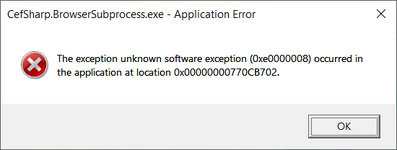
When 7 Days gobbled up my physical RAM and things started swapping (paging, whatever) I did get a crash window. It is attached along with the log.

Many players are experiencing similar issues and are unsure of the cause. While I know a large number of similar cases are occurring, we haven't been able to pinpoint the cause. I'm not trying to be disruptive, but rather to provide information to those handling the issue that this is indeed happening.
Not disruptive, but informative. I was worried that I was the only one, or one of a handful. I do not recall this happening in 2.5, but the last one I played before that was 1.0.
 

Attachments

Not disruptive, but informative. I was worried that I was the only one, or one of a handful. I do not recall this happening in 2.5, but the last one I played before that was 1.0.
This has also happened to players in my community, and it's not just one case. It didn't happen before V2.0, a few cases occurred after V2, and then it exploded in large numbers after V2.6.
 
Recent versions have indeed fixed many bugs, but some fixes may leave hidden performance issues in the future. For example, TFP fixed the floating issue of tree growth cards. In the fixed code, we saw that planted seeds would loop and check their grown area, causing significant performance loss, especially when planting a forest. Fixes are good in themselves, but the cost seems too high; it's like losing a watermelon to pick up a sesame seed. Many similar fixes exist, and the TFP team should really spend some time reviewing older code to find areas that could be significantly optimized. Of course, this is just a suggestion; please don't attack me.
 
I just tried the game again. Loaded in and I was literally a few seconds from before the crash. Got this in the console and log-file.
Code:
2026-04-21T22:44:12 112.067 ERR Exception in thread GenerateChunks:
2026-04-21T22:44:12 112.070 EXC Object reference not set to an instance of an object
  at WorldDecoratorBlocksFromBiome.decoratePrefabs (World _world, Chunk _chunk, Chunk cX1Z0, Chunk cX0Z1, Chunk cX1Z1, System.Boolean _chunkOverlapsTrader, GameRandom _random) [0x00093] in <673cee7f1b1143818476bdf642f7434b>:0 
  at WorldDecoratorBlocksFromBiome.DecorateChunkOverlapping (World _world, Chunk _chunk, Chunk cX1Z0, Chunk cX0Z1, Chunk cX1Z1, System.Int32 seed) [0x001f1] in <673cee7f1b1143818476bdf642f7434b>:0 
  at ChunkProviderGenerateWorld.decorate (Chunk _chunk) [0x0009c] in <673cee7f1b1143818476bdf642f7434b>:0 
  at ChunkProviderGenerateWorld.tryToDecorate (Chunk _chunk) [0x00018] in <673cee7f1b1143818476bdf642f7434b>:0 
  at ChunkProviderGenerateWorld.updateDecorationsWherePossible (Chunk chunk) [0x00053] in <673cee7f1b1143818476bdf642f7434b>:0 
  at ChunkProviderGenerateWorld.GenerateSingleChunk (ChunkCluster cc, System.Int64 key, System.Boolean _forceRebuild) [0x00179] in <673cee7f1b1143818476bdf642f7434b>:0 
  at ChunkProviderGenerateWorld.GenerateChunksThread (ThreadManager+ThreadInfo _threadInfo) [0x0004c] in <673cee7f1b1143818476bdf642f7434b>:0 
  at ThreadManager.myThreadInvoke (System.Object _threadInfo) [0x0005e] in <673cee7f1b1143818476bdf642f7434b>:0 
UnityEngine.StackTraceUtility:ExtractStringFromException(Object)
Log:Exception(Exception)
ThreadManager:myThreadInvoke(Object)
System.Threading.ThreadHelper:ThreadStart_Context(Object)
System.Threading.ExecutionContext:RunInternal(ExecutionContext, ContextCallback, Object, Boolean)
System.Threading.ExecutionContext:Run(ExecutionContext, ContextCallback, Object, Boolean)
System.Threading.ExecutionContext:Run(ExecutionContext, ContextCallback, Object)
System.Threading.ThreadHelper:ThreadStart(Object)

2026-04-21T22:44:12 112.071 INF Exited thread GenerateChunks
 
That looks like your world got corrupted (or at least one region) when you crashed last time. Check your save's regions folder to see if there are any 0 byte regions.
 
I just tried the game again. Loaded in and I was literally a few seconds from before the crash. Got this in the console and log-file.
Code:
2026-04-21T22:44:12 112.067 ERR Exception in thread GenerateChunks:
2026-04-21T22:44:12 112.070 EXC Object reference not set to an instance of an object
  at WorldDecoratorBlocksFromBiome.decoratePrefabs (World _world, Chunk _chunk, Chunk cX1Z0, Chunk cX0Z1, Chunk cX1Z1, System.Boolean _chunkOverlapsTrader, GameRandom _random) [0x00093] in <673cee7f1b1143818476bdf642f7434b>:0
  at WorldDecoratorBlocksFromBiome.DecorateChunkOverlapping (World _world, Chunk _chunk, Chunk cX1Z0, Chunk cX0Z1, Chunk cX1Z1, System.Int32 seed) [0x001f1] in <673cee7f1b1143818476bdf642f7434b>:0
  at ChunkProviderGenerateWorld.decorate (Chunk _chunk) [0x0009c] in <673cee7f1b1143818476bdf642f7434b>:0
  at ChunkProviderGenerateWorld.tryToDecorate (Chunk _chunk) [0x00018] in <673cee7f1b1143818476bdf642f7434b>:0
  at ChunkProviderGenerateWorld.updateDecorationsWherePossible (Chunk chunk) [0x00053] in <673cee7f1b1143818476bdf642f7434b>:0
  at ChunkProviderGenerateWorld.GenerateSingleChunk (ChunkCluster cc, System.Int64 key, System.Boolean _forceRebuild) [0x00179] in <673cee7f1b1143818476bdf642f7434b>:0
  at ChunkProviderGenerateWorld.GenerateChunksThread (ThreadManager+ThreadInfo _threadInfo) [0x0004c] in <673cee7f1b1143818476bdf642f7434b>:0
  at ThreadManager.myThreadInvoke (System.Object _threadInfo) [0x0005e] in <673cee7f1b1143818476bdf642f7434b>:0
UnityEngine.StackTraceUtility:ExtractStringFromException(Object)
Log:Exception(Exception)
ThreadManager:myThreadInvoke(Object)
System.Threading.ThreadHelper:ThreadStart_Context(Object)
System.Threading.ExecutionContext:RunInternal(ExecutionContext, ContextCallback, Object, Boolean)
System.Threading.ExecutionContext:Run(ExecutionContext, ContextCallback, Object, Boolean)
System.Threading.ExecutionContext:Run(ExecutionContext, ContextCallback, Object)
System.Threading.ThreadHelper:ThreadStart(Object)

2026-04-21T22:44:12 112.071 INF Exited thread GenerateChunks
Map loading is stuck, it seems there's a map leak issue in versions V2 and later. Previous versions also had this problem, but the TFP programmers need to find the root cause.
 
That looks like your world got corrupted (or at least one region) when you crashed last time. Check your save's regions folder to see if there are any 0 byte regions.
Smallest region in the save is 76kb. They fluctuate from that small size up to over 5MB.

I think I'm done. In all of the years 7 Days was in alpha/EA, it was an absolute blast. I may have crashed once in all of those years. This is the fifth or sixth corrupted save in two weeks. I'm done. FWIW, I loaded in, got on my motorcycle and rode it a bit. It sank into the road slightly by the trader and half of the trader never loaded in. Never been to the trader up north, and it was the purpose of our trip. Jumped off the bike, fell through the ground, enabled debug mode but not fast enough. I pressed 'Q' to enable god-mode, but I was not allowed to go up or down or look around. Teleporting with the map was useless as I stayed underground.

I quit and restarted, above ground. Moved toward the trader to to get my back and as his shop loaded in I got the chunk error in the console again. Bikes now have white symbols. Enabled god-mode and flew around but could not find them. We're all just burned on it for now. If we play again it will very likely be in alpha or 1.0, where the game was stable.
Code:
2026-04-21T22:55:14 360.456 ERR [FELLTHROUGHWORLD] Teleport respawn failed. Local player blockPos: 0, 0, 0, Chunk is null.
NullReferenceException: Object reference not set to an instance of an object
  at EntityPlayerLocal.UpdateRespawn () [0x001af] in <673cee7f1b1143818476bdf642f7434b>:0 
  at PlayerMoveController.updateRespawn () [0x00262] in <673cee7f1b1143818476bdf642f7434b>:0 
  at PlayerMoveController.Update () [0x0016a] in <673cee7f1b1143818476bdf642f7434b>:0
This is spammed a billion times in the log where I fell through the world. I tried "tp 0 0 0" and no dice.
 
Recently I've experimented a lot with heavy modded biomes in v2.6. Three large biome mods with hi-res textures, a lot of varuios trees, plants, grass and other stuff on every biome, much much more than in vanilla game. And I've got random crashes in different places and different errors in the log file every time when traveled fast though the world by using fly mode or a fast vehicle to look at every biome.
The only solution that helped me to get rid of these random crashes is reducing of 'job-worker-count' parameter in the boot.config. My CPU is 6 core (12 threads) AMD Ryzen 5 5600x, GPU is AMD Radeon RX 7800 XT and the game was using all 12 threads by default:

JobSystem: Creating JobQueue using job-worker-count value 11
[PhysX] Initialized MultithreadedTaskDispatcher with 12 workers.


I've set 'job-worker-count=3' and now have these messages in the console:

JobSystem: Creating JobQueue using job-worker-count value 3
[PhysX] Initialized MultithreadedTaskDispatcher with 4 workers.


No more random crashes, the game is stable as a rock and I didn't notice any performance decrease.
 
Back
Top