

Blackmadman
Refugee
- Version
- 2.6
- Platform
- Windows
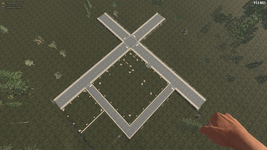
On our server, we leveled the terrain to build a city together. To do this, we filled in some areas, cut away others, and smoothed the surface. The top layer of the roads was covered with asphalt, and the top layer of the other areas was covered with topsoil. In some places, we also used gravel and dirt. Before the update to 2.6, it looked like this:
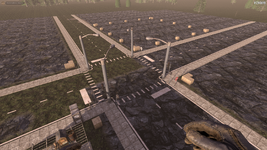
After the update to 2.6, some of the roads look like grass and some look like rocks. The other areas (grass) still look like grass in some places, but mostly like rocks or dirt. The gravel is also incorrect; it looks like rocks as well. See here:
We’ve already tried placing other terrain blocks or building blocks beneath the top layer, but all attempts to restore it to the state it was in 2.5 have failed. It would be great if we could place topsoil/grass, asphalt, dirt, and gravel again and have them actually look like those materials. Or if additional terrain blocks could be added that have a fixed texture that doesn’t change.
There’s nothing about this in the logs.
After the update to 2.6, some of the roads look like grass and some look like rocks. The other areas (grass) still look like grass in some places, but mostly like rocks or dirt. The gravel is also incorrect; it looks like rocks as well. See here:
We’ve already tried placing other terrain blocks or building blocks beneath the top layer, but all attempts to restore it to the state it was in 2.5 have failed. It would be great if we could place topsoil/grass, asphalt, dirt, and gravel again and have them actually look like those materials. Or if additional terrain blocks could be added that have a fixed texture that doesn’t change.
There’s nothing about this in the logs.
- Reproduction Steps
- Build something similar. Either in 2.5 and then load it into 2.6, or build it directly in 2.6. The results are identical in both cases.

