Windows Fullscreen video setting is reversed

Space4Ace

Hunter
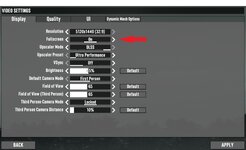
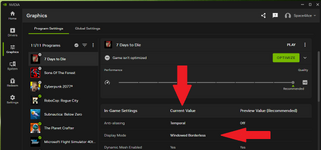
When choosing Fullscreen in game, you get Windowed Borderless reported in NVidia App. If you choose Exclusive Fullscreen in game, you get Fullscreen reported in Nvidia App.
In other words those settings are possibly reversed in game, as I would think that Nvidia reports the display mode correctly, since it's fine in other games.

See below:
1768877137388.jpeg

1768877152372.png
 
When choosing Fullscreen in game, you get Windowed Borderless reported in NVidia App. If you choose Exclusive Fullscreen in game, you get Fullscreen reported in Nvidia App.
In other words those settings are possibly reversed in game, as I would think that Nvidia reports the display mode correctly, since it's fine in other games.

See below:
These days, if you have an option for exclusive fullscreen, that is what most people just call fullscreen. The option for fullscreen would be for windowed borderless mode in such a case. It's a confusing way to name it, but that's started to become common. Some games use the old method of fullscreen, windowed, or windowed borderless. Others are starting to use exclusive fullscreen, windowed, or fullscreen. I put those in the same order for what they refer to.
 
These days, if you have an option for exclusive fullscreen, that is what most people just call fullscreen. The option for fullscreen would be for windowed borderless mode in such a case. It's a confusing way to name it, but that's started to become common. Some games use the old method of fullscreen, windowed, or windowed borderless. Others are starting to use exclusive fullscreen, windowed, or fullscreen. I put those in the same order for what they refer to.
I guess I just learned something new. Thanks!
 
Classically, Exclusive Fullscreen put the system in a kind of forced mode where the application using that mode was given absolute primary access to GPU, RAM, ect. in the system. Whereas bordered windows or borderless fullscreen shared all resources with the rest of the desktop with no exclusive access. Exclusive Fullscreen was primarily used when you had a game that had a high GPU demand, so that it would perform well.

Most modern hardware is capable enough that very few games default to exclusive fullscreen, or even offer it as an option anymore. Some you can force the mode using command arguments.

One drawback to running an application in Exclusive mode is that you are not able to easily swap to other applications. However, this again can be negated somewhat with varying settings or workarounds. Used to be that you could use the Exclusive Fullscreen mode with 7 Days, and start the game with the argument -popupwindow. This would run the app in exclusive mode, but it would behave like it was borderless fullscreen when you switched to other applications. (Handy for when you have a multi-monitor setup.) I haven't tested that functionality in a couple of years though.
 
As the other two stated, expected behavior. I suppose another reason you would run exclusive is if you wanted to use some of the new RTX features on filters with Nvidia. Some of them are nice, but they require fullscreen exclusive for some reason... so I don't use it (as not all games have launcher arguments you can put in like -popupwindow)
 
Back
Top