
DED-EFIM
Refugee
Based on what criterion did you include the search there? My statistics are completely differentNAPVP is currently shown as the #2 ranked server in world by BattleMetrics.com, 7 Days to Die server rankings.
View attachment 39722


Based on what criterion did you include the search there? My statistics are completely differentNAPVP is currently shown as the #2 ranked server in world by BattleMetrics.com, 7 Days to Die server rankings.
View attachment 39722
If this is the only thing I'm currently interested in using Teragon for, what's the quickest method of learning how to do just that? I want to avoid things like this:Just in case you're interested, the latest version of Teragon adds an option that allows you to "fix" roads (adapt road terrain).
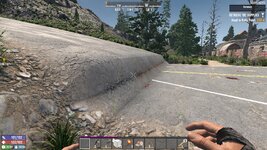

If this is the only thing I'm currently interested in using Teragon for, what's the quickest method of learning how to do just that? I want to avoid things like this:
View attachment 39731
I'm trying to play with the compopack POIs, but I tend to get stuff like this which is a compromise I'd rather not have to make

It's probably quicker (and funnier) to build one of those two blocks long ramps...If this is the only thing I'm currently interested in using Teragon for, what's the quickest method of learning how to do just that? I want to avoid things like this:
View attachment 39731
I'm trying to play with the compopack POIs, but I tend to get stuff like this which is a compromise I'd rather not have to make


The 29th was meant to be a goal date barring there are no nasty bugs and certification stalls. It could drop today, but it also could drop tomorrow or next week. It just depends on how well things are going on their end.Is stable still scheduled for release tomorrow?
Where are you getting these dates from? Did the developers promise to release the stable version on that date? ...No... So why all this speculation and wishful thinking?The 29th was meant to be a goal date barring there are no nasty bugs and certification stalls. It could drop today, but it also could drop tomorrow or next week.
Its on one of their 3.0 post broWhere are you getting these dates from? Did the developers promise to release the stable version on that date? ...No... So why all this speculation and wishful thinking?
Yea but they could delay it further for more optimizations, but so far its today sometime if cert isnt having issues with ps or xbox7 Days to Die - V3.0 Streamer Weekend - Steam News
Hey Survivors, We are pleased to announce that 7 Days to Die V3.0 Dead Hot Summer Streamer Weekend Event will begin: THIS FRIDAY, June 12th at 12 PM CST. Fans will have a ton of great options to see all the new features & content of 3.0: 3 days of streaming 500+ streamers 48+ Countries 20+...store.steampowered.com
Right here is the 29th announcement.
There's no gamebreaking bugs and if there is cert issues they should know by now.
So if it's not coming out on the 29th it should have been announced by now, unless they are just trying to ■■■■ people off again.
From whom? From people just like you and me... Where is the confirmed date? Everything else is just guesswork.Its on one of their 3.0 post bro
It was given if you were to click the link you were so kindly provided. Thank you.Where are you getting these dates from? Did the developers promise to release the stable version on that date? ...No... So why all this speculation and wishful thinking?
Yeah, I saw that—thanks—but I think it was rash to write that to the developers... (I was wrong).It was given if you were to click the link you were so kindly provided. Thank you.

Wait....what? In 2026, really?... (I was wrong).
If the stable version were going to be delayed, they would have announced it yesterday.Where are you getting these dates from? Did the developers promise to release the stable version on that date? ...No... So why all this speculation and wishful thinking?
Another naive soul...If the stable version were going to be delayed, they would have announced it yesterday.
No one is going to announce it in advance; even they don't know for sure if everything is okay...One thing I noticed is they did a survey recently about what people want to see in the game. I don't recall ever seeing one of those when TFP were solely in charge.In my opinion, TFP are still developers working on a shoestring or "on their knees," so to speak. I wonder what actually changed when they joined Behaviour, because from where I stand, it feels like nothing has changed at all.

On a Sunday? Not likely.If the stable version were going to be delayed, they would have announced it yesterday.

I hope everyone did that surveyOne thing I noticed is they did a survey recently about what people want to see in the game. I don't recall ever seeing one of those when TFP were solely in charge.