Windows CRITICAL: Unresolved, Permanent UI Fallback Error in All Builds/Languages (SYSTEM CHECKED)

Shaidan

Refugee
Version
2.4
Platform
Windows

Dear The Fun Pimps Team,

I am reporting a highly unique and permanent UI Texture Fallback error that persists after exhausting all troubleshooting options, including deep system checks.
The Problem:
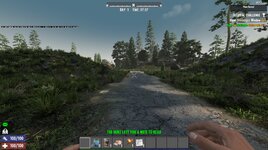
A debug text ("If you can read this message, call an emergency number...") is permanently displayed in the 2D UI Layer of the game.
  • Reproducibility: The error occurs always in brand-new savegames and is confirmed to persist across all in-game languages (switching languages changes the text from German to English fallback).
  • Initial Fix: The related crash with the Windows Snipping Tool was fixed by using Windowed mode.
Exhaustive Troubleshooting Performed (All Failed):
  1. System Integrity Check: sfc /scannow found no corrupted Windows system files.
  2. Hardware Check: The issue is unique to 7 Days to Die and does not manifest in other intensive applications, suggesting the VRAM is functional.
  3. Full Clean Reinstallation: Game uninstalled, installation folder manually deleted, and reinstalled.
  4. Build Version Test: Switched to an older build (v2.3) and back, forcing a complete asset re-download. The error persisted in the older build.
  5. AppData Cleanup: Entire %appdata%\7DaysToDie folder manually deleted.
  6. System Cache: DirectX/Shader Cache cleared via Windows Disk Cleanup.
  7. Rendering: Tested with the -force-opengl launch option.
Conclusion:
Since the error persists across different builds, all languages, and the system integrity is confirmed, the issue is a fundamental failure to load a core UI asset, which is likely either corrupted on the Steam download source or triggered by a highly specific engine conflict on the user's system. This requires developer investigation.


System Specifications


ComponentSpecification
OSMicrosoft Windows 11 Pro, Version 10.0.26200
DriverGame Ready Driver - 581.80 - Tue Nov 4, 2025
CPUAMD Ryzen 7 5800X3D 8-Core Processor
RAM64.0 GB
GPUNVIDIA GeForce RTX 5080
VRAM16303 MB GDDR7
Resolution2560 x 1440 (Native)
Refresh Rate165 Hz
 
Reproduction Steps
The issue is NOT triggered by a specific action; it is permanent on my system configuration.1. Perform a **Clean Installation** of the game (Delete AppData/Installation folders, then reinstall).2. Start the game in **Windowed Fullscreen** mode.3. Load a **BRAND NEW Savegame** (Random Gen).Expected result: The core UI asset loads correctly.**Actual result: The UI fallback debug text is visible immediately upon spawning in the game world and remains visible.**
Link to Logs
https://pastebin.com/9SnQcF2n
Link to Screenshot/Video
https://youtu.be/DFRQjByw0p8

Attachments

  • 7days ui error text.jpg
    7days ui error text.jpg
    645.8 KB · Views: 12

Dear The Fun Pimps Team,

I am reporting a highly unique and permanent UI Texture Fallback error that persists after exhausting all troubleshooting options, including deep system checks.
The Problem:
A debug text ("If you can read this message, call an emergency number...") is permanently displayed in the 2D UI Layer of the game.

  • Reproducibility: The error occurs always in brand-new savegames and is confirmed to persist across all in-game languages (switching languages changes the text from German to English fallback).
  • Initial Fix: The related crash with the Windows Snipping Tool was fixed by using Windowed mode.
Exhaustive Troubleshooting Performed (All Failed):

  1. System Integrity Check: sfc /scannow found no corrupted Windows system files.
  2. Hardware Check: The issue is unique to 7 Days to Die and does not manifest in other intensive applications, suggesting the VRAM is functional.
  3. Full Clean Reinstallation: Game uninstalled, installation folder manually deleted, and reinstalled.
  4. Build Version Test: Switched to an older build (v2.3) and back, forcing a complete asset re-download. The error persisted in the older build.
  5. AppData Cleanup: Entire %appdata%\7DaysToDie folder manually deleted.
  6. System Cache: DirectX/Shader Cache cleared via Windows Disk Cleanup.
  7. Rendering: Tested with the -force-opengl launch option.
Conclusion:
Since the error persists across different builds, all languages, and the system integrity is confirmed, the issue is a fundamental failure to load a core UI asset, which is likely either corrupted on the Steam download source or triggered by a highly specific engine conflict on the user's system. This requires developer investigation.


System Specifications


ComponentSpecification
OSMicrosoft Windows 11 Pro, Version 10.0.26200
DriverGame Ready Driver - 581.80 - Tue Nov 4, 2025
CPUAMD Ryzen 7 5800X3D 8-Core Processor
RAM64.0 GB
GPUNVIDIA GeForce RTX 5080
VRAM16303 MB GDDR7
Resolution2560 x 1440 (Native)
Refresh Rate165 Hz
Your log is marked as private, so no one will be able to help you. Post it again without it being private.
 

Dear The Fun Pimps Team, I am reporting a highly unique and permanent UI Texture Fallback error that persists after exhausting all troubleshooting options, including deep system checks. The Problem: A debug text ("If you can read this message, call an emergency number...") is permanently displayed in the 2D UI Layer of the game.
  • Reproducibility: The error occurs always in brand-new savegames and is confirmed to persist across all in-game languages (switching languages changes the text from German to English fallback).
  • Initial Fix: The related crash with the Windows Snipping Tool was fixed by using Windowed mode.
Exhaustive Troubleshooting Performed (All Failed):
  1. System Integrity Check: sfc /scannow found no corrupted Windows system files.
  2. Hardware Check: The issue is unique to 7 Days to Die and does not manifest in other intensive applications, suggesting the VRAM is functional.
  3. Full Clean Reinstallation: Game uninstalled, installation folder manually deleted, and reinstalled.
  4. Build Version Test: Switched to an older build (v2.3) and back, forcing a complete asset re-download. The error persisted in the older build.
  5. AppData Cleanup: Entire %appdata%\7DaysToDie folder manually deleted.
  6. System Cache: DirectX/Shader Cache cleared via Windows Disk Cleanup.
  7. Rendering: Tested with the -force-opengl launch option.
Conclusion: Since the error persists across different builds, all languages, and the system integrity is confirmed, the issue is a fundamental failure to load a core UI asset, which is likely either corrupted on the Steam download source or triggered by a highly specific engine conflict on the user's system. This requires developer investigation.

System Specifications


ComponentSpecification
OSMicrosoft Windows 11 Pro, Version 10.0.26200
DriverGame Ready Driver - 581.80 - Tue Nov 4, 2025
CPUAMD Ryzen 7 5800X3D 8-Core Processor
RAM64.0 GB
GPUNVIDIA GeForce RTX 5080
VRAM16303 MB GDDR7
Resolution2560 x 1440 (Native)
Refresh Rate165 Hz
Disable DLSS. You may need to reinstall your graphics drivers if you want to use DLSS or use a different version of those drivers.
 
It worked fine with the latest drivers in DLSS until yesterday, then the game crashed. I restarted it and then this appeared. Of course, I already reinstalled the driver and tried three other versions without any change. Sure, I can set it to native and then it's gone, but that also massively degrades the graphics and reduces the FPS.
 
It worked fine with the latest drivers in DLSS until yesterday, then the game crashed. I restarted it and then this appeared. Of course, I already reinstalled the driver and tried three other versions without any change. Sure, I can set it to native and then it's gone, but that also massively degrades the graphics and reduces the FPS.
I can't tell you why it stopped working, but the game didn't update (assuming you weren't using an old version and only now updated). That means some change on your system - driver update, Windows update, etc. - is related. That's about all I can say since I don't know what's changed on your system.

It's definitely a DLSS issue, and that's usually a driver problem. Try using DDU to remove your drivers and go directly to the nVidia website to get new ones. From what others have said, it's best to avoid game ready drivers. If you're using the full GPU application rather than just the driver, check the settings in it to make sure nothing has been changed to force certain settings on the game, which can potentially cause problems. Though that shouldn't be an issue in this case since it was working before unless a driver update enabled something that was previously disabled or vice versa.

It could also possibly be a hardware problem, but that's the least likely cause.

For reference, though it doesn't include any additional information other than confirmation that it was a driver issue, here is someone who had the same problem:
 
Back
Top